Pagember

If you’re building a one-page site for a local service, try the same task in both editors: add your service, put a call button where it is easy to find on a phone, then hand the draft to whoever will update it. Start with a hosted builder if they can make those edits and the plan covers what you need. Look at WordPress if you need a specific booking integration or more control over hosting, and decide who will handle updates and restores. Compare plan prices and renewal costs and check what can move to another platform before you commit.

This comparison uses self-hosted WordPress: the open-source software running with a host you choose. A hosted editor is a different service arrangement. If you are deciding between the two WordPress setups, see how WordPress.com and self-hosted WordPress differ. This is a decision about operating responsibility, not a claim that the same website can be moved unchanged between every product.
What exactly are you comparing?
A hosted builder combines editing with the service running the site. Webnode is a good fit for a small information site: templates, hosting, HTTPS and a mobile-ready layout come in one subscription, and it has built-in multilingual versions if you serve more than one language. Try a representative page and confirm the required features and exit procedure before committing.
WordPress is software you can extend through themes and plugins without a WordPress software licensing fee. Choosing it still leaves a hosting and maintenance decision. A host can handle some of that work, so self-hosted does not necessarily mean maintaining a server alone. WordPress features.
| Approach | Choose it when | Verify before paying |
|---|---|---|
| Hosted website builder | The team wants one service for editing and hosting, and it already offers the required features. | Try the contact or booking workflow and check which plan supports your domain. |
| WordPress you maintain | You need a specific plugin or publishing workflow and have someone to maintain it. | Test that workflow and confirm who handles updates, backups and recovery. |
| WordPress with managed hosting | You need WordPress and want the host to take on specific operational tasks. | Confirm which updates, backups and restores the plan covers. |
If you choose WordPress, compare shared and managed WordPress hosting by the actual support and maintenance the provider includes. Kinsta is a managed option that handles updates to the server, daily backups and staging; hosting.com covers shared and managed plans. If you want drag-and-drop layouts on WordPress, Elementor adds a visual page builder.
Choose by the editing work you will repeat
Make a list of the pages you will actually publish: a home page, a service description, a contact page, a portfolio and perhaps a growing library of articles. Then try building a representative page rather than choosing from a gallery of attractive demos.
WordPress's native editor works with content blocks such as paragraphs, images, headings and lists. A separate commercial page builder is not a prerequisite for writing posts or pages. WordPress block editor documentation.
A practical evaluation should answer four questions:
- Can you change a heading, add a useful image description and rearrange sections without help?
- Can you keep repeated details, such as opening hours, consistent across pages?
- Can you create the kind of navigation your readers need as content grows?
- Does your chosen template remain readable on a small screen after you replace the demo text with your own?
These questions should be tested against your own content. The demonstration below checks one native WordPress draft; it does not compare hosted-builder accounts.
A concrete WordPress editing example
On October 15, 2026, we saved a six-block service-page draft in our WordPress 7.1.3 installation and selected the editor's mobile preview. The heading, paragraphs and three-item list remained readable in that preview. The canvas measured 479 pixels including its scrollbar.
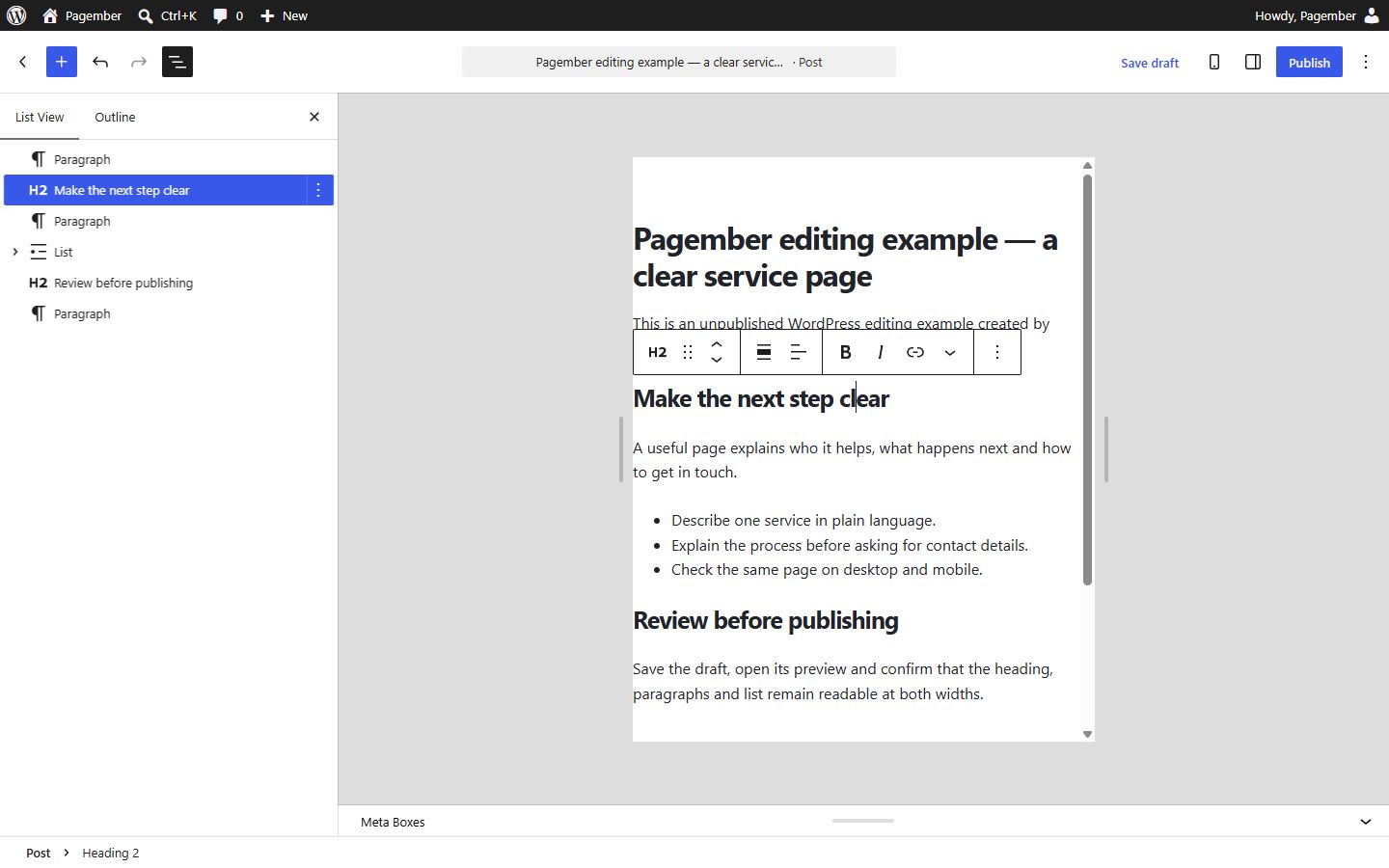
This demonstrates one native editing workflow you can try before choosing an extra tool. We did not test a hosted builder account, public publishing, support quality or performance. Repeat the same task with your own template and real copy before deciding.
Write down who will maintain the site
WordPress's official update guidance recommends keeping the software updated and making a backup before an update. Its backup handbook distinguishes site files from the database; you need both for a complete recovery plan. WordPress updates and WordPress backups.
| Task | Question for a hosted builder | Question for a WordPress setup |
|---|---|---|
| Platform updates | Which parts of the platform are maintained by the service? | Who updates core software, themes and plugins? |
| Recovery | What can be restored, how far back, and who can request it? | Are files and database backed up, and has recovery been checked? |
| Account access | Can you recover the owner account if a staff member leaves? | Who controls the host, domain and WordPress administrator accounts? |
| Custom features | Is the feature built in, an add-on, or unavailable? | Is there a supported extension, and who maintains it? |
| Help | Does support cover the problem you need solved? | Is the problem covered by the host, extension developer or your maintainer? |
You remain responsible for decisions such as who gets access, what content you upload and whether you retain an independent copy of important material. Outsourcing infrastructure does not remove those decisions.
Compare the complete cost, including time
Prepare two budgets for the same requirements and the same period. For the builder, include the eligible site subscription, domain renewal, mailboxes, necessary apps and any selling or payment costs. For WordPress, include hosting, domain renewal, any paid theme or extensions, backup arrangements and maintenance help you expect to need.
Build both quotes from the payable total and renewal conditions. Put the first payment, renewal and paid extras into the same period for both platforms. The small-website budget example shows how hosting, a domain and email can appear on the bill.
A custom domain is a plan question. Webnode documents Premium as a prerequisite for using your own domain and applies the subscription to one website. Verify the selected tier, renewal and required features directly.
Assign a realistic owner for recurring work. If you dislike maintaining software, a cheaper invoice can still be a poor fit when nobody has time to investigate a broken form. If you already have a capable maintainer, paying to outsource the same task twice may add little value.
Check your exit before committing
| Platform | What can move | What to verify |
|---|---|---|
| Webnode | The product list can be exported. The working site runs on Webnode. | Keep your text and media separately. Plan to rebuild the pages and test their URLs. |
| Wix | You can keep a separately managed domain. A working Wix site requires Wix hosting, and Wix documents no native blog export to another platform. | Save original media and map the URLs for priority pages and posts before canceling. |
| Squarespace | The WordPress-format export includes layout pages and one blog. It excludes store pages and design settings. | Open an imported image and check that it loads from the new site. An image can still point to the old site. |
| Self-hosted WordPress | The WXR export moves supported content. A working copy also needs the database and files. | Restore a private copy and check that your theme, plugins and any host-specific settings still work. |
Before committing, try moving one page, one image and your hardest requirement to a private destination. Check where the image is served from, map the old page URL and note what needs rebuilding. Confirm separately what happens to your domain and mailboxes if you cancel.
A hypothetical example: a tutor's website
Maya is a hypothetical tutor who needs five information pages and a clear way for prospective pupils to contact her. She expects to revise prices twice a year and has no custom application requirement. An eligible hosted builder could fit if its contact workflow, domain conditions and renewal budget work for her.
Now change the requirement: Maya wants to publish a searchable library of lessons, let another editor review drafts and use a specific learning extension. WordPress becomes worth evaluating, provided that extension is suitable and someone owns maintenance. It does not win solely because the future site will have more pages.
The decision changes because the workflow changes.
A decision checklist
- List today's essential features and separate them from speculative future features.
- Try one real page, its mobile layout and the editing tasks you will repeat.
- Get written answers about maintenance, recovery and support scope.
- Compare equivalent initial and renewal budgets, including email and necessary add-ons.
- Check export options and account ownership before a long commitment.
- Choose the arrangement you can operate reliably, with enough flexibility for the requirements you can actually describe.
For your next decision, browse our website tool comparisons to compare specific platforms and responsibilities before choosing a plan. If you prefer a hosted builder, compare CMS workflows for a content site or booking, inquiries, and selling for a small business. For GoDaddy's classic builder and Airo, see our GoDaddy website builder guide.
If your main uncertainty is whether a builder needs a second hosting subscription, read Do website builders include hosting?