
Keep the original export, choose column types before spreadsheet conversion, and compare the saved result with representative source records before importing it back into a website.
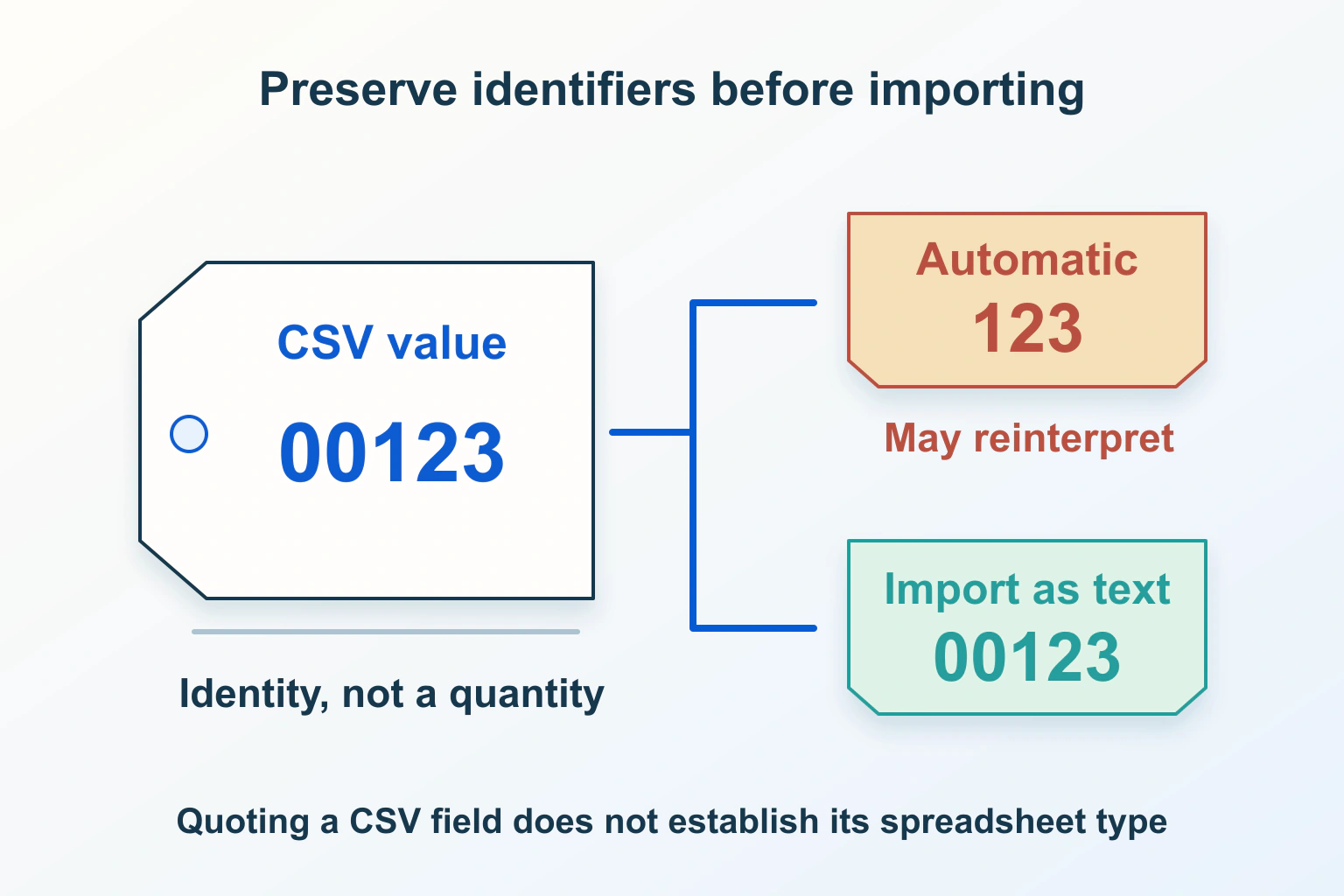
A website exports a customer reference as 00123. A spreadsheet opens the file and shows 123. Someone then saves the edited sheet and imports it back into the website. The visible number looks plausible, but the identifier may now refer to a different record or fail to match anything. The download itself was not necessarily wrong.
This guide follows a fictional workshop directory exporting public listing references, appointment dates and quantities. Its example values are synthetic. The review exercises are proposed checks, not a claim that a particular spreadsheet edition or website importer has been tested.
Keep a raw export before opening an editing copy
Save an untouched copy and record when it was exported. Inspect a small harmless sample as plain text before blaming the website for what appears in a spreadsheet. If the original contains 00123 and the opened workbook contains 123, you have identified a boundary worth investigating. If both already contain 123, the earlier export or stored record needs a different review.
RFC 4180 describes CSV records, fields and quoting conventions. It does not provide a spreadsheet cell-type schema. Quotes help represent field contents such as delimiters and line breaks; they are not a universal command that every receiving program must keep a value as text. The document is informational, and real implementations vary.
Keep the raw file separate from your working copy until the round trip is accepted. A screenshot of how a cell looks is not a substitute for the original characters. For private exports, perform this work in the approved local environment rather than uploading the file to an unknown online conversion service.
Define each column by meaning, not appearance
Write a short data dictionary. A listing reference identifies an item; it is not an amount to add. A quantity is a number. A date needs a defined interpretation. A blank value may mean unknown rather than zero. Decide those meanings with the website’s importer before choosing spreadsheet formats.
Microsoft documents automatic conversions that remove leading zeros, convert some strings to dates or scientific notation, and limit numeric precision to 15 significant digits. Its guidance includes importing relevant columns as text. Some newer conversion controls are edition-specific. Formatting after a lossy conversion does not recover the original missing digits.
In the workshop example, treat the listing reference as text from the start. Decide whether the appointment date will remain an explicitly specified date or an unchanged text representation accepted by the destination. Avoid applying one type to every column merely to stop one troublesome field from changing.
Review the import preview before accepting conversion
Use the receiving program’s deliberate import workflow and inspect the preview. Confirm the separator, character interpretation, column boundaries and types. Pick a representative sample that includes leading zeros, a long identifier, an ambiguous date and an empty optional field. Do not restrict the sample to easy values such as short whole numbers.
The current LibreOffice Text Import documentation distinguishes explicit Text and date column types, locale-sensitive number detection and a separate option to import wholly quoted fields as text. Disabling special-number detection alone does not make every decimal-looking identifier text. Those are importer choices, not properties guaranteed by a pair of CSV quotation marks.
Record the settings needed for the actual program and version your team uses. A colleague double-clicking the file may take a different import route. Give them the route and expected sample results, not just the instruction to open the CSV carefully.
| Proposed sample | Intended meaning | Compare after import |
|---|---|---|
| 00123 | Listing identifier stored as text | All five original characters |
| 12345678901234567 | Long external reference, not arithmetic | Every digit and its order |
| 03/04/2026 | Date with an agreed interpretation | The intended calendar day |
| Empty optional field | No supplied value | No invented zero or placeholder |
Distinguish display formatting from stored value
A cell can display five digits without retaining the original five-character identifier. Ask the reviewer to compare the underlying value and the exported text, not only the styled grid. If a number is padded for display, establish what the next CSV export will actually contain.
Do not reconstruct missing identifier digits from guesswork. If the field was altered, return to the preserved raw file or the authoritative website record. A code that appears recoverable by adding zeros may still be ambiguous when several original records have different lengths.
For the workshop, keep a tiny comparison sheet with the original identifier, imported value and saved-again value. Mark a difference for investigation rather than automatically normalizing it. The purpose is to preserve meaning across the boundary, not to make every row look aesthetically uniform.
Test the saved file before reimporting it
Save an editing copy, then inspect a controlled export from that copy as plain text. Compare it with the synthetic fixtures. Next, have the website maintainer use an isolated import or preview workflow to confirm which records would change. A successful spreadsheet save says nothing about the destination’s matching rules.
Check one intentional edit and several untouched values. In this example, change a listing’s public description while retaining its identifier and appointment date. The review should show the correct target record and no unexplained conversion of the fields that were meant to stay unchanged.
Stop if the preview reports unexpected new records, unmatched references or broad changes. Preserve the failed working copy for diagnosis and return to the original export. Do not keep applying changes to the live directory in the hope that a later import will fix an earlier conversion.
Document a repeatable export contract
Publish concise instructions alongside the export: column meanings, accepted date format, identifier handling, import route and one small example. Keep the instructions tied to the actual receiving workflow. If customers use several spreadsheet programs, test those routes separately instead of claiming universal compatibility.
Use the related guides to Can your CSV export run formulas? Review spreadsheet interpretation before staff open it, Fix broken accents and strange characters on a website without corrupting more text and Website numbers and currencies: format for the reader without changing the amount for adjacent concerns. Formula safety, character encoding and preserving data types are different checks. A dependable CSV workflow makes each boundary explicit and verifies the final records before a bulk change reaches the website.
Sources and verification
Editorial review 2026-10-15. Source check dates are recorded separately. Notes describe what each source supports and its limits.
View sources
- RFC 4180 — CSV formatChecked CSV documents records, fields and quoting, not a spreadsheet cell-type schema.
Limits: Informational format description; implementations and import policies vary. - Microsoft — Keeping leading zeros and large numbersChecked Automatic conversion can remove zeros, change dates and lose numeric precision; import identifier columns as text.
Limits: Available conversion controls depend on the Excel edition and version. - LibreOffice — Text ImportChecked Explicit Text and date column types control interpretation; quoted-as-text is a specific import option.
Limits: Quoting alone is not a universal instruction to preserve a textual type.