
Preserve the original bytes, identify the first boundary where a known phrase changes, and repair that scoped import, storage or delivery path before verifying a representative character set.
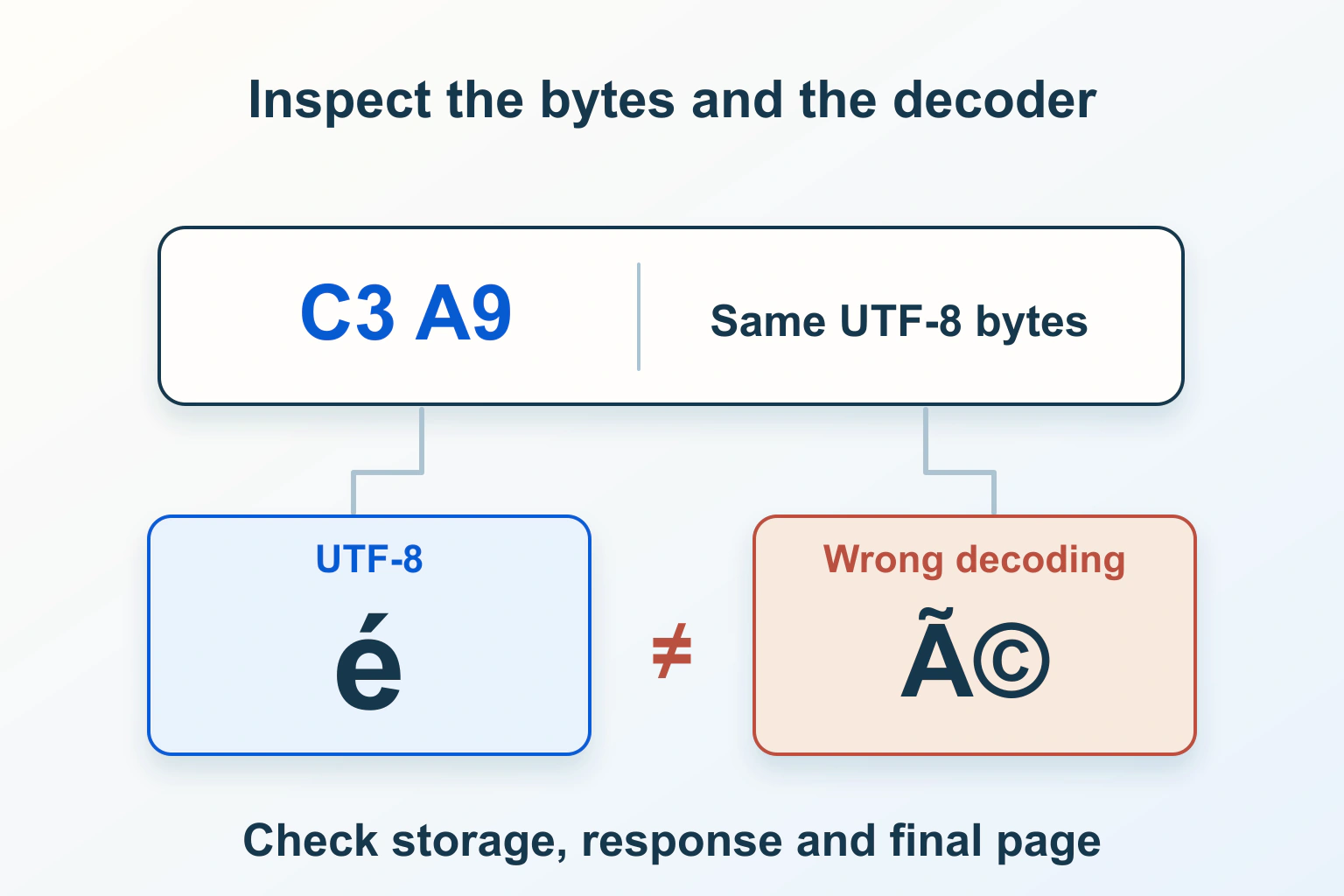
Find where a known phrase first becomes damaged before changing encoding settings. The original document, stored content, delivered bytes and browser display are separate stages. Labelling all of them UTF-8 does not repair a phrase that was already decoded and saved incorrectly.
This guide focuses on HTML pages. It uses a fictional café workshop handout and illustrative character examples, not a production repair or database conversion we performed. Keep the original file and a recoverable copy of affected content before experimenting.
Recognize the kind of failure
A correct word such as café might appear as café after bytes are interpreted using the wrong encoding. This kind of garbled text is often called mojibake. A replacement character, identified as U+FFFD, can instead indicate that a decoder could not represent an input sequence. A box where a symbol should be can also be a font-coverage problem.
These symptoms suggest questions, not a complete diagnosis. If the stored text already contains the unwanted characters, changing the page’s declaration may faithfully display that damaged text. If the stored text is correct but the response is decoded incorrectly, rewriting the database is the wrong layer.
| Observation | Question to investigate | First comparison |
|---|---|---|
| Only an imported paragraph is garbled | Did the import decode the source correctly? | Original file and stored paragraph. |
| Accents across the delivered page are wrong | Do response bytes and encoding declarations agree? | Actual response, headers and browser interpretation. |
| A character is correct when copied but displays as a box | Does the active font cover it? | Text value and rendered font. |
| The same text is damaged in the editor and public page | Was the corruption saved earlier? | Last good source and current stored content. |
Keep bytes, labels and characters separate
A character is not the same thing as the bytes used to encode it. In UTF-8, the character é is represented by the hexadecimal bytes C3 A9. Interpreting those bytes through an incompatible encoding can produce different characters; saving that result can turn a delivery mistake into stored corruption.
W3C’s encoding guidance recommends UTF-8 for new web content. The content must actually be saved in that encoding. A label describes how data should be interpreted; it does not transform the file’s existing bytes.
For the workshop handout, preserve the source file unchanged and make a separate working copy. Record the application’s reported file encoding and the known correct sentence. Do not repeatedly save the only original with different encoding options while guessing which one makes the preview look better.
Follow one phrase through the publishing path
Choose a short phrase whose correct spelling is known. In the fictional example, it includes an accented letter, a curly quotation mark and an em dash. Compare the original document, the import or editor view, a controlled content export and the public response.
Record the first disagreement. If the original is correct but the imported draft is wrong, examine the import’s supported input encoding. If the draft is correct but the public page is wrong, inspect rendering and delivery. If only a search excerpt or email is wrong, follow that separate output path instead of assuming the article body shares it.
Keep comparisons private when they contain unpublished or personal information. A diagnostic note needs the boundary and a minimal synthetic example, not a full database dump pasted into a public forum.
Inspect the response that the browser actually received
The Content-Type header reference explains the media type and optional charset parameter. For an HTML page, an illustrative response declaration is:
Content-Type: text/html; charset=utf-8Check the final document response in the browser’s network tools, including whether it came through a cache. Do not inspect an image or a redirect response and assume its headers describe the HTML article. The compressed delivery indicated by Content-Encoding is a separate matter from character encoding.
Compare the public response with the controlled source under the site’s documented tooling. Merely opening a downloaded file in an editor that guesses encodings is not a reliable byte comparison. Ask the maintainer to identify the actual encoding at the boundary when the available interface cannot show it confidently.
Make declarations agree with the data
W3C’s HTML declaration guide places the complete meta declaration within the first 1024 bytes, normally near the start of the head. A simple illustrative declaration is:
<meta charset="utf-8">Use the supported template or application setting to produce the declaration. Check the actual response rather than adding conflicting tags in several plugins. A correct declaration paired with legacy-encoded bytes is still a mismatch.
The HTML encoding-detection algorithm includes byte-order marks, transport information and in-document declarations. In ordinary HTML detection, a recognized initial BOM takes precedence over the HTTP charset, which takes precedence over a meta declaration. The complete algorithm has further context, including user-override considerations. Do not apply that short hierarchy blindly to XML or unrelated formats.
Adding a BOM to conceal a conflicting server configuration is a poor substitute for a consistent publishing path. Establish which component supplies each declaration and correct the mismatch through its supported configuration.
Choose the smallest recoverable correction
If one imported draft is damaged, return to the preserved original and repeat that import with the documented correct encoding in a rehearsal environment. Compare the result before replacing the affected live content. Do not convert an entire database to fix one paragraph.
If correct stored text is delivered with a wrong charset, correct that response path and inspect fresh and cached responses. If an intermediate export or integration changed the text, repair that transformation rather than overwriting every downstream copy manually.
For a database-wide issue, involve the maintainer with a backup and tested migration plan covering the application’s connection, storage and output behavior. A database character-set setting is not a universal repair switch. Our WordPress migration workflow provides broader recovery planning, not an encoding-conversion command.
Know when the original is necessary
Some garbling can be reversed only when its transformation is known and the original information survives. If different characters were replaced by the same placeholder or bytes were discarded, the damaged string may no longer contain enough information to reconstruct the original.
Use the last good document, backup or source-system record to resolve that loss. A global replacement of every à or question mark can alter legitimate text and still leave other corruption. Correct the affected records with verified originals and keep the scope reviewable.
Language selection is a separate concern. Changing a site’s locale does not repair incorrectly decoded text. Our translation workflow explains content and interface language layers without treating them as encoding repairs.
Verify more than the first accent
Use a controlled sample containing the languages and symbols the site actually supports: accented letters, punctuation, currency signs and relevant non-Latin text or emoji. Check the editor, saved content, public page and any affected secondary output. A corrected café heading is insufficient if the next save damages the paragraph again.
Keep the original backup until the repair and subsequent publishing cycle have been verified. Record the faulty boundary, scoped change, tested sample and remaining questions. The dependable result is a consistent path from correct source characters to correct public text, with no unexplained mass substitutions along the way.
Sources and verification
Editorial review 2026-10-15. Source check dates are recorded separately. Notes describe what each source supports and its limits.
View sources
- W3C Internationalization: Choosing and applying a character encodingChecked UTF-8 as the recommended encoding for new web content and the distinction between actual data encoding and its declaration.
Limits: A declaration does not convert bytes or repair text already transformed incorrectly in storage. - W3C Internationalization: Declaring character encodings in HTMLChecked HTML meta charset placement within the first 1024 bytes, consistency with HTTP declarations and HTML byte-order-mark precedence.
Limits: These are HTML rules; XML and other formats have their own handling, and changing a declaration alone is not conversion. - WHATWG HTML Living Standard: Determining the character encodingChecked The HTML browser encoding-detection algorithm, including byte-order marks, transport information and in-document declarations.
Limits: The complete algorithm contains contextual and user-override considerations; the article's BOM, HTTP and meta summary is not a universal algorithm for every content format. - MDN Web Docs: Content-Type headerChecked Media type and charset information in the HTTP Content-Type header, distinct from compression represented by Content-Encoding.
Limits: A header observed for one response does not establish every route, cached response or underlying database encoding.