 Pagember

To track how AI search engines mention your brand with Writesonic, set up a GEO project for your website, choose the topics and prompts your customers would ask, add competitors, then watch your Visibility percentage, citations and missing prompts each week. Fix the gaps with content updates and outreach, and use Writesonic's article and audit tools to ship those fixes. Paid plans track ChatGPT, Gemini and Google AI Overviews daily; Enterprise covers more platforms.
What GEO and AI visibility mean
Writesonic's help center defines GEO (Generative Engine Optimization) as the practice of making sure your brand shows up in AI-powered responses. Instead of only asking "where do we rank on Google?", you ask "when someone asks an AI assistant about our category, are we named, and is our site cited?"
Writesonic's vocabulary guide maps familiar SEO terms to AI search terms:
| SEO term | AI search term | What it means |
|---|---|---|
| Keyword | Prompt | The conversational question a user types into an AI platform |
| SERP | Answer | The full answer the AI writes from several sources |
| Ranking position | Mention position | Where your brand appears inside the answer |
| Organic traffic | AI visibility | How often your brand appears across tracked answers, as a percentage |
| Backlinks | Citations | When an AI references your content as a source |
For a small business, the practical question is simple: when a buyer asks an AI assistant for the best option in your category, are you on the list?
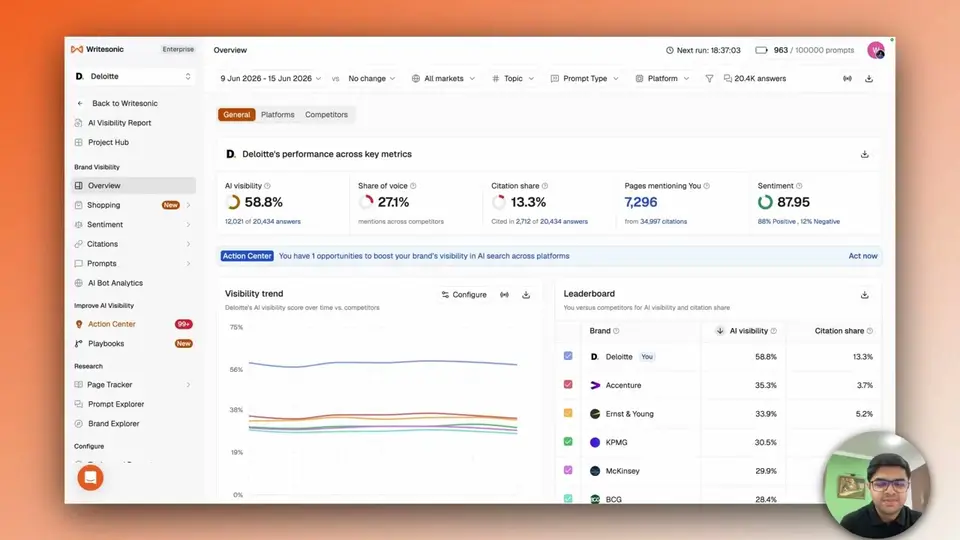 Play video: Getting Started with Writesonic AI Search (GEO Dashboard Tour)
What to measure
Writesonic's dashboard shows many numbers. Its GEO getting-started guide suggests focusing on a few, and its vocabulary guide explains how they are calculated.
| Metric | How Writesonic defines it | What to do with it |
|---|---|---|
| Visibility | Answers where you are mentioned ÷ total answers tracked × 100 | Your main success measure; track the trend, not one day |
| Answers Mentioning Me | The raw count of answers that include your brand | Confirms growth in volume across reporting periods |
| My Pages Cited vs Total Pages Cited | Your pages used as sources, compared with all cited pages | A low share means competitors' pages are chosen instead |
| Market share and Market position | Your visibility relative to tracked competitors, and your rank among them | Shows whether you are gaining ground, not just growing |
| Sentiment | Positive mentions ÷ total mentions × 100 | Flags answers that describe you poorly (sentiment analysis is listed on Growth and Enterprise) |
| Missing prompts | Prompts where competitors are mentioned but you are not | Your to-do list for new or improved content |
The guide frames it this way: think of mentions as awareness and citations as trust. To grow, you need both.
One caution from Writesonic's own docs: answers vary across platforms and over time, and normal day-to-day volatility can be 30% or more. Judge progress on weekly and monthly trends.
Set up your first GEO project, step by step
These steps follow Writesonic's "GEO: Getting Started" guide in its help center.
- Enter your website URL. For most businesses, this is the homepage.
- Set the Scope. The default, Domain, covers the whole site. You can narrow it to Exact URL (one page), Path (a section like /blog/) or Subdomain.
- Choose your Primary Target Location and give the project a simple Name, such as "Your Brand — US". Click Continue.
- Pick "Optimize for AI Search Engines" when asked how you want to get started, then click Continue.
- Set your market. Choose the target country and language. If you have a region-specific homepage, add it here.
- Choose 2 to 10 topics that describe what you sell or the categories you want to compete in. Writesonic suggests topics based on your site.
- Generate and review prompts. Use the slider to choose how many prompts to generate within your plan's limit. Deselect any that do not fit, and use Add Prompt and Save Prompt to add the questions your customers really ask.
- Add competitors. Review the suggested list and add others by pasting their website URL and clicking Add. A few key competitors are enough to start.
- Wait for the first report. The guide says it can take a few minutes. You get a notification when the AI search insights report is ready.
Tip for prompt writing: Writesonic's prompt guide recommends being specific. A prompt like "what are the best bakeries for custom wedding cakes in Austin" tells you far more than a vague one.
A weekly AI visibility routine
Writesonic tracks answers daily on its paid plans. A short weekly review is enough for most small teams. Here is a routine built from the workflows in Writesonic's help center.
- Monday: check the trend. Open the dashboard and look at Visibility Trends Over Time, Visibility and Answers Mentioning Me. Note any platform that moved sharply.
- Review missing prompts. On the Missing Prompts page, filter by platform or topic and pick two or three high-intent prompts. Writesonic's guide suggests grouping similar prompts and answering them with one strong page.
- Check citations. Compare My Pages Cited with Total Pages Cited. If competitors' pages win, review how they are structured and what they include, then improve your own page.
- Find outreach targets. The Citation Opportunities page lists sites already cited in AI answers that do not mention you. Writesonic suggests reaching out to ask for inclusion.
- Ship one fix. Update or publish one page that targets a missing prompt. Writesonic's guide recommends clear headings, concise paragraphs, lists and tables, and wording that mirrors how customers ask.
- Log it. Note the date and page, then check whether the prompt drops off the Missing Prompts list over the following weeks. The guide says AI systems need time to re-crawl, from days to weeks depending on the platform.
On the Growth plan, the Action Center ranks opportunities by impact. Its example workflow: click Address now on an action such as getting mentioned on high-authority third-party sites, review the pages, then use Draft Email for a personalized outreach draft.
Using Writesonic's content tools to close gaps
Tracking only helps if you act on it. Writesonic bundles content and SEO tools with its AI visibility plans.
- AI Article Writer: Writesonic's help center describes AI Article Writer 6 as supporting tone customization, internal linking, source citations through links or footnotes, cover images made with its AI tools, an FAQ section and a call to action. Each paid plan includes a set number of AI articles per month (see the plans table).
- Site audits: each plan includes a number of site audits per month, with a cap on pages analyzed per audit.
- AI Bot Analytics: Writesonic's docs describe server-side tracking of AI crawler visits, human visits from AI answers, and a bot error rate, with setup guides for Cloudflare, WordPress, Vercel and other platforms. Check the pricing page's feature table for which plans include it.
- Integrations: the pricing page lists Google Search Console, WordPress and GA4 integrations.
A useful loop: take a missing prompt, draft or refresh an article that answers it directly, publish it, then watch that prompt in your tracking over the next few weeks.
Writesonic plans at a glance
Regular prices from Writesonic's official pricing page, checked November 18, 2026:
| Plan | Billed annually | Billed monthly | AI platforms tracked | Prompts / answers tracked daily | AI articles per month | Users / projects |
|---|---|---|---|---|---|---|
| Starter | US$79/month | US$99/month | ChatGPT, Gemini, Google AI Overviews | 50 / 150 | 15 | 1 / 1 |
| Basic | US$199/month | US$249/month | ChatGPT, Gemini, Google AI Overviews | 100 / 300 | 25 | 2 / 1 |
| Growth | US$399/month | US$499/month | ChatGPT, Gemini, Google AI Overviews | 200 / 600 | 50 | 3 / 2 |
| Enterprise | Custom | Custom | All 8 platforms | Custom | Custom | Custom |
More details from the same page:
- Site audits: Starter 10 per month (100 pages each), Basic 20 (1,200 pages each), Growth 50 (2,500 pages each).
- Sentiment analysis is included on Growth and Enterprise. The Action Center is a trial on Growth (5 off-page and 5 on-page actions per month) and full on Enterprise.
- Enterprise platforms: the pricing FAQ lists ChatGPT, Gemini, Google AI Overviews, Google AI Mode, Perplexity, Claude, Grok and Muse Spark.
- Markets: one language and country on Starter, Basic and Growth; custom on Enterprise.
- Add-ons: extra articles at +20 for US$100/mo, and additional users at US$50/user/mo, on eligible plans.
- Trial and cancellation: the FAQ says no credit card is needed to start, downgrades and cancellations take effect next billing cycle, and there is a 7-day refund.
- A fair usage policy applies.
Best fit: Starter suits a single brand that wants to see where it stands. Growth suits teams ready to act on sentiment and Action Center recommendations. To compare current plans and start a trial, visit See Writesonic plans.
Troubleshooting
Your visibility jumped or dropped overnight. Writesonic's docs describe answer variation of 30% or more per day as normal. Compare weekly averages before changing strategy.
You are mentioned, but not for the topics that matter. Writesonic's guide suggests going back to your topics and prompts and adding questions that match how customers actually search.
Your visibility is low on one platform only. Each AI platform draws on different sources, according to Writesonic's platform behavior guide. Check the platform breakdown and the citations that platform favors.
A fixed prompt still shows as missing. Allow time for AI systems to re-crawl. Writesonic's Missing Prompts page suggests checking back in a few days or weeks.
You ran out of prompts. The prompt slider shows your account-level usage. Remove low-value prompts or move to a plan with a higher prompt allowance.
Your competitors are not the right ones. Edit the project to replace suggested competitors with the brands your customers actually compare you with.
Related guides
The Writesonic page summarizes the plans. A citation in an AI answer proves less than it seems, so read the guide to what an AI citation proves about traffic before reporting Visibility as visits. For the search side of the same routine, use the analytics and Search Console basics, and the llms.txt guide answers whether that file affects AI search.
Common questions
Which AI search engines does Writesonic track?
Starter, Basic and Growth track ChatGPT, Gemini and Google AI Overviews, per the pricing page checked November 18, 2026. Enterprise tracks eight platforms, including Perplexity, Claude and Google AI Mode.
What is a good AI visibility score?
Writesonic's vocabulary guide calls above 70% excellent and 40–70% good, and says below 30% needs work. The trend matters more than any single day, because answers vary.
How often does Writesonic check AI answers?
The pricing page lists daily tracking frequency on all plans.
Do I need a credit card to try Writesonic?
No. The pricing FAQ says you can sign up and explore without a credit card.
Can Writesonic help me fix gaps, not just report them?
Yes. Paid plans include AI articles and site audits, and the Growth plan adds an Action Center trial that ranks fixes and drafts outreach emails. Enterprise includes the full Action Center.