
Treat the chosen variant as one coherent offer: selection, image, amount, availability and basket line must all describe that same combination.
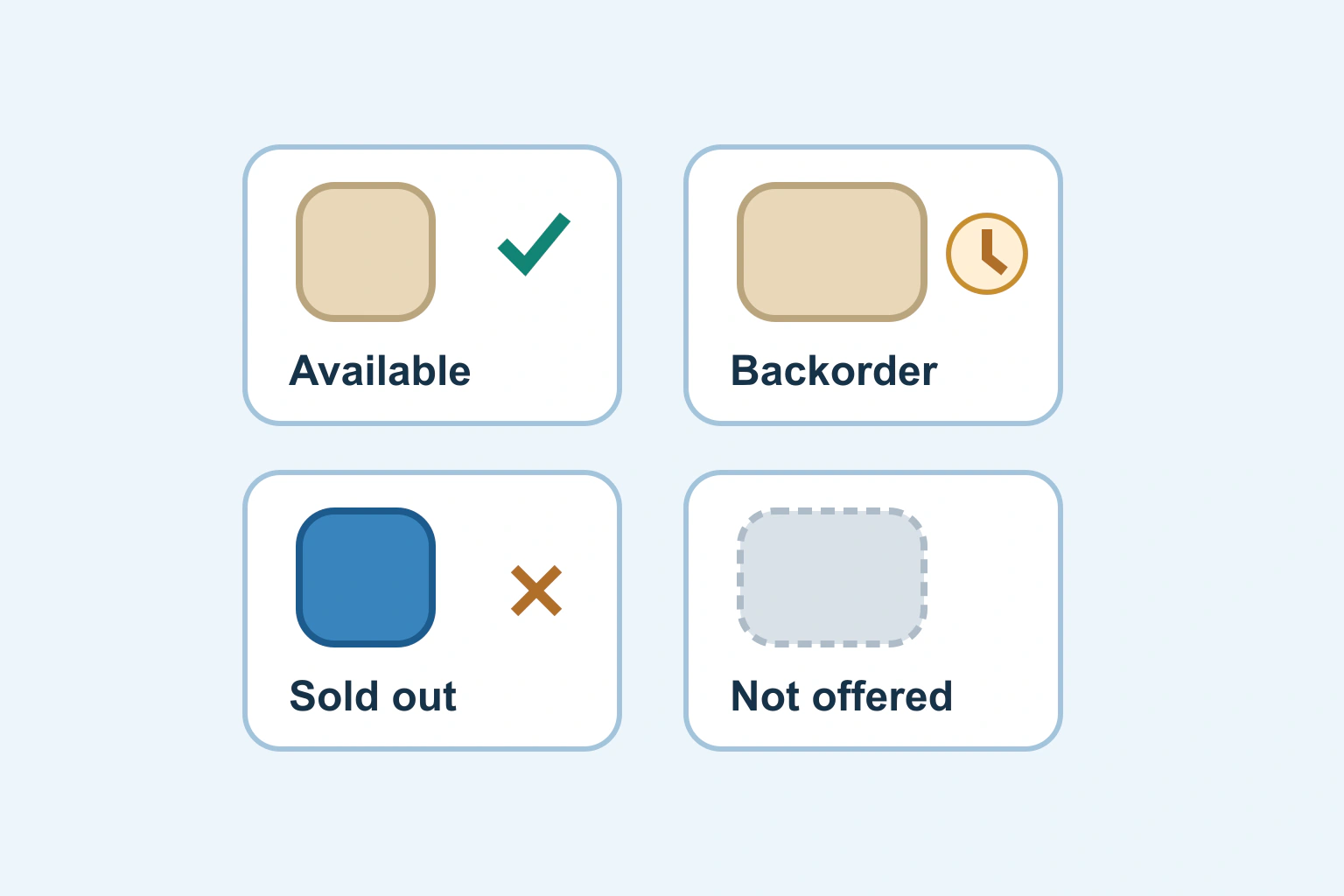
A product page is clear when the selected options, picture, price, availability and basket entry all describe the same purchasable item. A customer should not have to guess whether the large blue version costs more, is sold out or has silently reverted to another option after following a shared link.
Review the complete selection journey rather than styling colour swatches in isolation. The question is which exact offer the customer is reviewing and committing to buy at each stage.
Define the real variations before designing controls
List the attributes that change the physical or digital item: size, colour, material, capacity, licence or pack quantity. Then list the combinations actually sold. Three colours and four sizes do not prove that all twelve combinations exist.
Give every purchasable combination a stable internal identity. Keep the product family separate from the item chosen for the basket. A display label can change for clarity without becoming the inventory key or a reason to lose the relationship between old orders and their purchased version.
Google’s item-group documentation illustrates grouping related variants while keeping their individual identities and distinguishing attributes. That data model is useful context; this guide concentrates on the customer-facing choice rather than feed approval.
Distinguish a starting price from a selected price
A category card can show a price range when it honestly represents the available options. Once a visitor chooses a complete variation, show the amount for that selection. A From amount should not continue looking like the final payable item price after a more expensive choice is active.
Describe the pricing unit: each, pack, licence or subscription period. If a pack contains several items, separate its total from any useful per-unit comparison. Explain required option charges before the basket rather than allowing a low headline figure to carry the entire impression.
For formatting, our currency and locale guide distinguishes display conventions from the underlying amount. Showing a familiar currency symbol alone can be ambiguous when the audience uses several dollar currencies.
Work through a fictional product matrix
Imagine a fictional store selling a linen cushion cover in two colours and two sizes. The small natural version is available, the large natural version is on backorder, small blue is sold out and large blue is not manufactured. Those are four different customer situations.
| Choice | Meaning | Helpful presentation |
|---|---|---|
| Small natural | Available to purchase | Selected amount and active purchase route |
| Large natural | Backorder allowed | Backorder status and real timing information |
| Small blue | Existing variant, unavailable now | Sold-out state without a false purchase promise |
| Large blue | No such offered combination | Explain unavailable combination or prevent its selection |
Do not label every non-purchasable choice Out of stock. That can imply the large blue version will return when it has never been part of the range. A precise explanation helps the customer choose an alternative without inventing expectations.
Keep price and availability tied to the same selection
WooCommerce’s variable-product documentation provides one platform example of variation-specific prices, images and stock arrangements. The actual storefront presentation depends on its theme and configuration; the presence of a variation record does not prove the interface behaves correctly.
On the fictional page, choosing large should update the natural cover’s amount and backorder explanation together. If the picture remains blue after selecting natural, clarify whether that is an intentional lifestyle image or fix the mismatch. A customer should not need to infer the selected colour from a tiny border.
Decide whether inventory is genuinely shared across options or tracked per variant. This is an operational choice, not a design preference. A digital add-on bundled with one physical item may share stock differently from two separately stocked sizes.
Make selectors understandable without colour alone
Give each option a visible name and indicate the active state clearly. Blue and Natural explain more than two unlabeled circles. A patterned material or subtly different colour deserves useful text rather than an assumption that everyone can perceive the distinction.
W3C’s labels and instructions explanation supports helping people understand what input is expected. A Size group needs a meaningful question or label, while each choice needs its own understandable value.
The form accessibility guide covers associated labels, keyboard operation and feedback. Keep those checks separate from the commercial decision about which choices should exist. Attractive swatches can still be difficult or impossible to operate.
Preserve the choice through direct links and the basket
Open a shared link to a specific variant in a fresh session. Confirm the intended combination is selected and remains stable when the page finishes loading. Then add it to the basket and inspect its name, attributes, quantity and amount.
Check returning from the basket, changing a choice, refreshing and opening a second product tab. A choice stored only in an old browser session can make an administrator’s test look correct while a new visitor sees another default.
If a visible selected value disappears during submission, our disabled-versus-readonly guide explains one possible form-data boundary. Do not disable necessary fields before the product system captures the selected variation through its supported route.
Review mobile selection as an actual purchase task
Use a narrow viewport and try the longest option names, an unavailable combination and a changed quantity. Keep price, choice and purchase action close enough to understand together without making every control oversized. Ensure messages do not push the active selector offscreen unexpectedly.
Check that the image crop still shows the distinguishing feature. A large image of an ambiguous fabric detail may occupy the available space while failing to explain the selected item. Provide a useful full view and detail view where the product needs both.
Write expected outcomes before testing. The small blue choice should remain unavailable; it should not become purchasable merely because another combination has stock. The basket should preserve the exact selected option after every supported route.
Maintain the offer as one record of truth
Keep a product review sheet covering attribute identity, amount, stock source, image, direct link and basket result. Update it when the range changes, not just when a theme is redesigned. A newly added size can expose assumptions that were invisible with one option.
Accept the page when customers can tell what they selected, what it costs and whether it can be ordered, and the subsequent record agrees. Clear variation design is the visible result of consistent product data and a trustworthy selection journey.
Sources and verification
Editorial review 2026-10-18. Source check dates are recorded separately. Notes describe what each source supports and its limits.
View sources
- WooCommerce: Variable productsChecked A variable product can have variation-specific price, image and stock; presentation depends on the theme.
Limits: Platform example only; stock ownership and selector behavior vary by implementation. - Google: Item group IDChecked Grouped variants retain distinct item identity and accurate distinguishing attributes.
Limits: This does not establish eligibility for every category or target country. - W3C: Labels or InstructionsChecked Input controls need visible labels or instructions that explain the expected input.
Limits: Correct visible text does not alone verify keyboard behavior or accessible associations.