 Pagember

Do not treat every WordPress database value as ordinary text. Structured values can be serialized, with metadata that must remain consistent when their contents change. Define the exact intended replacement, use a suitable supported tool and verify application behavior as well as match counts.
This is one step of a domain change; the full sequence is in How to change your WordPress domain without breaking links or email.
Take a workshop site where a retired internal label “Room A” needs to become “Studio North” in a specific plugin configuration. It also appears in historical articles, customer notes and another site sharing the database. A database-wide replacement would be broader than the actual request even if it preserved serialization perfectly.
Ask whether bulk replacement is necessary
If the value is one setting exposed by the owning plugin, use that supported interface first. It may perform validation, update related fields and invalidate caches. Bulk replacement is justified by a defined workload, not simply because a command is available.
Record the old string, new string, owner, records that should change and records that must remain. Include case, punctuation and encoding expectations. “Replace every occurrence” is a materially different instruction from updating the current room configuration.
The options investigation guide covers identifying configuration ownership. A large stored value is not automatically disposable or safe to transform. Resolve its role before choosing a write method.
Understand the representation you are editing
PHP’s serialization manual describes a stored representation retaining value type and structure, potentially including binary data. WordPress’s maybe_serialize() reference shows how arrays and objects are serialized and how existing serialized strings can be nested for compatibility.
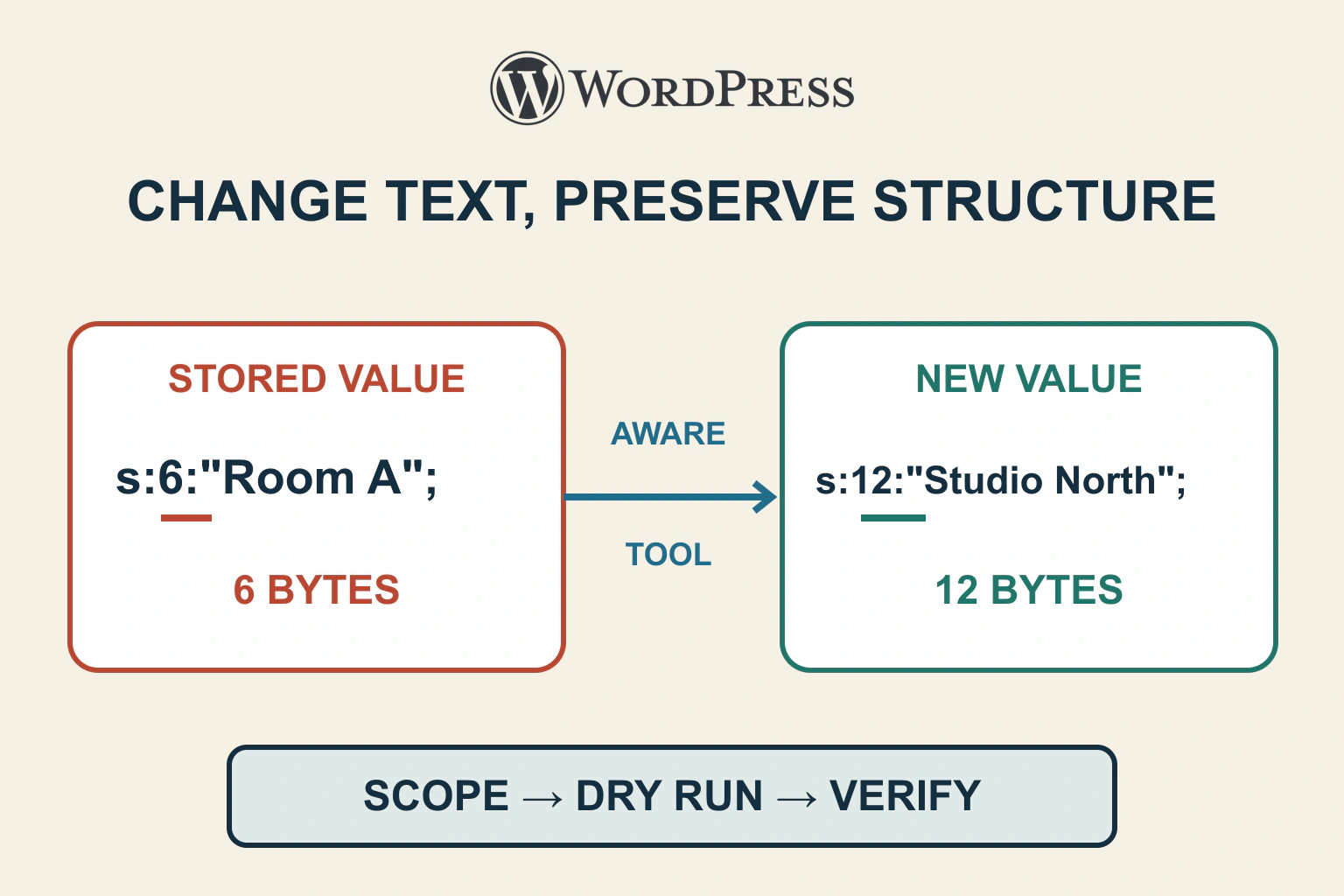
As an original simplified ASCII illustration, the string Room A can appear as s:6:"Room A";. Replacing only those visible characters with Studio North while retaining 6 leaves an inconsistent representation. The intended representation would account for the new twelve-byte ASCII string. This miniature is explanatory, not a repair instruction for a real database row.
Do not manually count and rewrite a real nested value. Multibyte text, embedded structures and owner-specific schemas make that approach fragile. Nor should an unfamiliar nested representation be flattened just because it looks redundant.
Choose serialization-aware scope
WP-CLI’s search-replace reference documents intelligent handling of PHP serialized data, table and column scoping, dry-run and export modes. By default it works with registered tables; broader flags change that boundary. Review the installed command’s help and version before relying on newer options.
For the room label, the plan should name the actual plugin-owned location and intended fields. Avoid all-tables scope when another application or site shares the database. An assumed table prefix is not proof of ownership.
| Location in the example | Intended action | Reason |
|---|---|---|
| Current room configuration | Update through its owner or scoped transform | This is the requested change |
| Historical article quotation | Preserve unless separately approved | It may correctly describe the past |
| Customer note | Preserve | Different data purpose and privacy scope |
| Another site’s settings | Exclude | Outside the intended installation |
The common case: changing the site domain
Most people reach for search-and-replace after moving a site to a new domain or from HTTP to HTTPS, when old URLs remain inside posts, widgets and serialized builder settings. Export the database first, then preview the change:
wp db export before-domain-change.sql
wp search-replace 'https://old-example.com' 'https://new-example.com' --dry-run --report-changed-only
wp search-replace 'https://old-example.com' 'https://new-example.com' --skip-columns=guid --precise
The dry run lists each table and column with the number of replacements and saves nothing. --skip-columns=guid leaves post GUIDs unchanged, since they identify posts to feed readers rather than serve as links. --precise handles every value in PHP, which is slower but safer for serialized data. Include the scheme in both strings so you do not rewrite unrelated text that happens to contain the domain name. The WordPress domain change guide covers the redirects, email and Search Console steps around this command. If the domain changes as part of a move to a new host, the BlogVault migration guide shows a route with a rollback point; run the same dry run afterwards to confirm no old URLs remain.
Prepare recovery before the rehearsal
WP-CLI documents database export to a file. Keep any such export protected outside a public web directory and out of source control. Database files can contain private records, credential material and operational settings.
The backup workflow covers the wider restore question. An exported database is not a backup of every uploaded file, and its presence does not prove restoration works. Record the recovery point and rehearse the relevant restore path privately.
Use a protected representative copy with external side effects disabled. Confirm its exact installation, database and table boundaries. A safe-looking command aimed at the wrong environment is still the wrong action.
Review the dry run as a proposal
A dry run shows what the chosen operation would match without saving the replacement. Compare its report with the planned locations. An unexpectedly large count means the scope needs investigation, not that the tool found more useful work.
Do not publish row contents or enable verbose value logging merely to obtain a convincing report. Use counts, table and column names plus privately inspected representative records. Preserve enough evidence to explain the match set without exposing real data.
Record the exact reviewed operation and environment. If either changes, the earlier dry run no longer establishes the new scope. A dry run also cannot prove the new label has the right business meaning.
Verify the rehearsal through the application
After an authorized rehearsal write, inspect structured values through the owning application interface. Confirm arrays, related identifiers and other settings remain intact. Compare representative records from both the intended change set and the exclusion set.
For the room label, open the room editor, save an unrelated harmless field and reload it. Then inspect public room information and any downstream selection using the configured room. A successful transformation report cannot establish these relationships.
The change-testing guide helps structure the acceptance run. Include a restore rehearsal and the same readbacks after restoring so rollback is demonstrated rather than assumed.
Define stop conditions before the rehearsal: matches outside the approved fields, unexpected structured-value errors, changed exclusion records or a failed application save. Preserve evidence and stop the transformation at that boundary. Do not keep broadening the operation until a familiar-looking screen returns.
For the room change, compare a before-and-after field map. The current label becomes Studio North; the room identifier, capacity and notification destination remain the same. Then deliberately revisit a historical article containing Room A and confirm its text remains intact. This paired check demonstrates both the requested positive change and a meaningful exclusion, rather than relying on a total replacement count.
Separate a live change from the preparation
A production operation needs explicit authorization for the exact target and scope. Plan how legitimate writes during the change are handled. Restoring a complete old database after new orders or edits arrive can erase those records.
Do not automatically apply the rehearsal command elsewhere. Preserve installed versions, reviewed exclusions and recovery evidence, then recheck the production proposal. For a small setting, the supported owner interface may still be the better final route.
Accept the work when the intended values change, structured data remains usable, excluded records stay intact and recovery is understood. The next useful deliverable is that concrete change proposal, not an unscoped SQL replacement copied from another migration.