 Pagember

Do not delete a domain’s mail records just because a website connection screen asks for a CNAME. First identify the exact name the instruction applies to. The bare domain, a www name and a verification name are different places in DNS, even when a dashboard groups them under one domain.
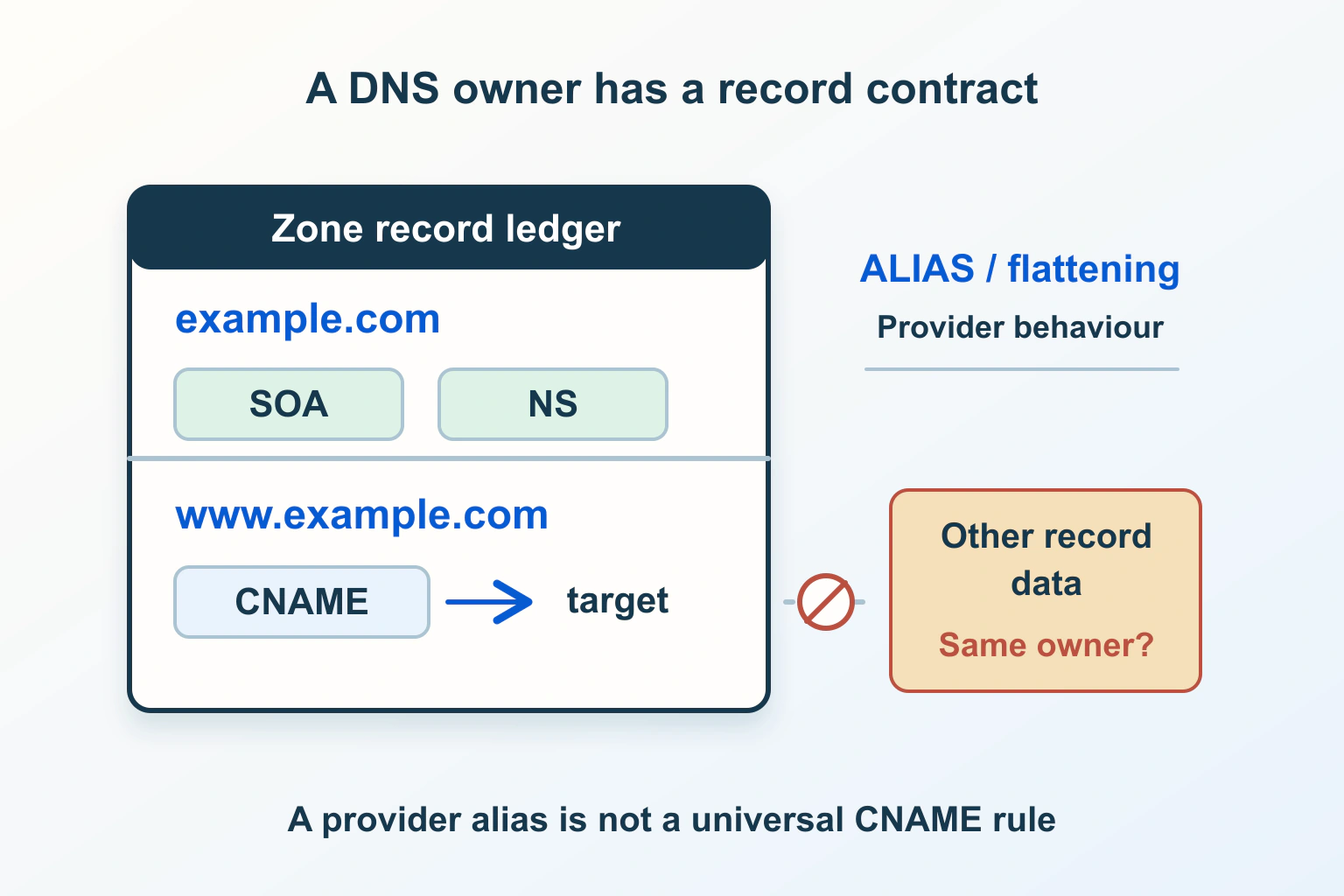
Imagine a pottery studio connecting a new brochure site. Its email already works at example.com, and a verification TXT record is present there. The website service supplies a target hostname, while the DNS editor rejects the proposed record as a conflict. The right next step is to reconcile the requested owner name and supported connection method, not clear the zone until the warning disappears.
Read the owner name and target as different things
In a DNS record, the owner is the name being configured. The value of a CNAME is the target name it aliases. For the studio, www.example.com might be the owner and a service-supplied hostname the target. Neither value should be guessed from the website’s visible page title.
Write the fully expanded owner name in your change note. An editor may represent the zone apex as @, a blank field or the domain itself, and may append the zone name to a short label. Inspect its documented convention before saving; a value entered twice can create an unintended longer name.
The DNS model in RFC 1034 describes a CNAME as an alias and requires SOA and name-server data at the top of a zone. An ordinary wire-format CNAME at that apex cannot replace the management records the zone needs. This is why a root-domain instruction needs careful interpretation.
Check coexistence at the exact same name
RFC 2181 clarifies that an alias name has one CNAME target and cannot also hold ordinary unrelated record data. DNSSEC-related exceptions exist; they do not permit adding MX or TXT beside an ordinary CNAME. The restriction concerns the same owner name, not every name within the domain.
| Proposed owner | Existing data to inspect | Decision before saving |
|---|---|---|
| www.example.com | Address records or an existing alias at www | Reconcile the website records at this exact name |
| example.com, the zone apex | SOA, NS and working service records such as MX and TXT | Use a supported apex connection method; do not remove zone essentials |
| A service verification name | Any data already owned by that exact verification name | Confirm the service’s expected record and avoid overwriting another verification |
| A different subdomain | Its own records and delegation, if any | Check this name separately rather than deleting unrelated apex records |
Suppose the studio has MX records at example.com and only an old A record at www.example.com. Those are two different conflict reviews. Replacing the old www website route need not imply replacing the apex email route. Start with the smallest record change the website service actually requires.
Here is what that change looks like for the studio. The addresses and hostnames are documentation placeholders; use the values your website service and mail provider give you.
| Name | Before | After |
|---|---|---|
| example.com | A 192.0.2.10 (old host) | A 203.0.113.20 from the new service, or the DNS provider's apex alias if the service asks for a hostname |
| example.com | MX 10 mx1.mail-provider.example | Unchanged |
| example.com | TXT v=spf1 include:_spf.mail-provider.example ~all | Unchanged |
| example.com | TXT verification value for another service | Unchanged |
| www.example.com | A 192.0.2.10 | CNAME sites.website-service.example, after deleting the old A record at www |
Only two rows change. The CNAME goes on www, where nothing else lives, and the bare domain keeps an address record so its MX and TXT records can stay beside it.
Distinguish ordinary CNAME answers from provider flattening
Some DNS products offer an apex alias, ANAME, ALIAS or CNAME-flattening feature. The label in a control panel is not enough to establish what other providers support. Ask what the authoritative DNS server returns and which existing records the feature permits alongside it.
Cloudflare’s flattening documentation describes resolving the configured target and returning a final IP address instead of a CNAME. It also warns that flattening CNAMEs used for third-party verification can prevent verification. This explains one implementation; it is not a universal instruction to enable flattening everywhere.
For the studio, obtain the current apex instructions from the website service and the matching feature instructions from the authoritative DNS provider. If those instructions do not agree, stop at that specific question. A service-supported address record or a supported apex-alias feature may be appropriate; copying another host’s IP address from an old forum post is not a dependable substitute.
Preserve the existing service map before changing records
Record the working website route, mail route and verification records with their owner names and purposes. Keep an export or other recoverable record of the zone through the provider’s supported interface. Identify who can approve the change and who can reverse it. Do not include account secrets in the change note.
Our domain connection guide covers the broader service inventory. For this particular conflict, focus on the names implicated by the CNAME instruction. An MX record at the apex, a TXT verification there and a CNAME under a separate label should not be treated as three interchangeable entries.
Check which nameservers are currently authoritative. Editing a dormant zone in a registrar account will not repair records served by another provider. Changing nameservers is a separate operation with a wider scope; do not combine it casually with a one-record website correction.
Make a bounded change with an explicit rollback
- Confirm the exact owner, record type and service-issued target in the current connection instructions.
- List existing records at that owner and identify each active dependency.
- Choose the documented connection method for the apex or subdomain; resolve any contradiction before editing.
- Save the existing affected values and agree what failure would trigger rollback.
- Apply only the intended record change through the authorized DNS interface.
- Check the authoritative answer, then the website and preserved services through their ordinary routes.
If a verification TXT record is involved, use the TXT verification workflow to confirm the name and purpose. Removing a verification record merely to make an alias save can break a service relationship without providing evidence that the website route is correct.
For the pottery studio, the acceptance note should say which website names load the intended site and whether inbound and outbound email still work through the established mail service. DNS pointing and an HTTP redirect are also separate jobs: resolving both names does not by itself choose the final address in a visitor’s browser.
Diagnose a wrong answer before waiting longer
When the DNS editor refuses a conflicting record, waiting for propagation cannot make an unsaved change valid. When the authoritative server returns the wrong target, waiting for a cache to expire cannot turn that target into the intended one. Separate those cases from a correct authoritative change that some resolvers have not yet refreshed.
The DNS authority and cache guide helps distinguish these stages. Collect the queried name, record type, answer source and time. If rollback is required, restore the affected values and then verify the result; existing caches may still need to refresh.
The useful final state is specific: the intended owner uses a supported website connection, the authoritative data matches the plan, and unrelated mail and verification dependencies remain intact. A disappeared dashboard warning alone is not enough evidence.