 Pagember

CustomGPT.ai becomes especially useful when people can ask a practical question and check the website material behind the answer. If a familiar page seems to be missing, a short investigation can be more productive than rewriting the prompt repeatedly. The useful question is where the page stopped becoming knowledge: discovery, fetching, indexing or the eventual answer.
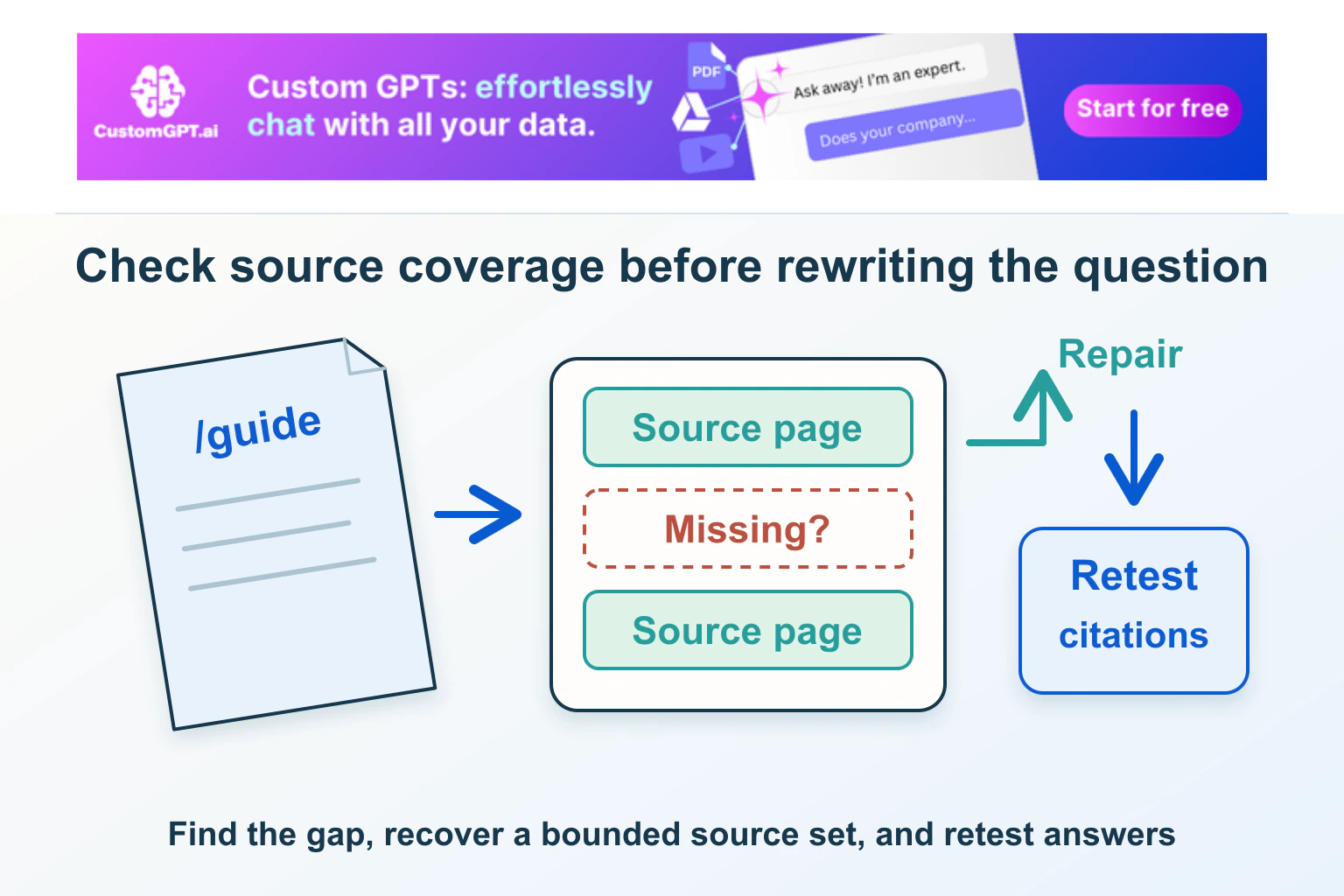
Consider a workshop business with a public delivery-information page. Its owner knows the page explains delivery areas, but the agent cannot give a useful answer about one area. The investigation below follows that single page.
Write down one expected answer before changing anything
Record the exact public URL, the relevant paragraph and the question a visitor would naturally ask. Add the date you checked the page. For the workshop, the useful fact might be that delivery is available to a named area only on a particular day. Keep the expected answer narrow enough that another person could verify it without guessing your intention.
Check that the paragraph still says what the owner remembers. An agent cannot reliably recover a policy that has been removed, contradicted or replaced with an ambiguous image. If the page itself needs an editorial correction, fix the approved source before treating the incident as an ingestion failure.
Use the CustomGPT.ai source-preparation guide for the broader writing process. Here, keep the investigation on an already approved page whose absence has a specific consequence.
 Play video: How To Build A Sitemap From Website Crawling | Website Crawling Tool - CuatomGPT
Separate URL discovery from having the page indexed
The official website-ingestion guide describes sitemap-first discovery. Without a sitemap, CustomGPT.ai follows discovered links on the same domain until no more are found or the agent’s page allowance is reached. A page with no discoverable links can leave only the supplied page indexed.
The guide also identifies missing sitemaps, slow pages and dynamically loaded content as possible causes of incomplete coverage. It recommends a complete sitemap and appropriate loading settings, including JavaScript execution where the content requires it.
For the workshop, check whether the delivery page is actually included in the connected source set. A separate help subdomain, an old address that redirects and an unlinked campaign page are different investigations. Do not assume that adding a homepage means every URL controlled by the business was included.
Read fetching and indexing as separate steps
The CustomGPT.ai source reference distinguishes crawl status from index status. Fetching retrieves the content; indexing processes it into the knowledge base. A successful fetch can coexist with queued indexing. Documented states also distinguish failure and limited processing.
Inspect the information exposed by your account, or ask the account owner or developer to inspect the documented source records. This guide does not assume that every dashboard presents the same controls. Do not paste an API credential into a support conversation just to obtain a status check.
Keep a simple recovery log. Record what is observed and what remains unknown; “the page is probably there” is not an observation. The following table is a proposed diagnostic aid, rather than a promise that one setting resolves every case.
| Observed situation | Next focused check | Evidence to retain |
|---|---|---|
| Expected URL is absent | Review source scope and discovery | Exact URL and connected source |
| Fetch remains queued | Allow processing and recheck status | Status and observation time |
| Fetch succeeds, indexing is queued | Wait for indexing before answer checks | Both separate status values |
| Processing fails or is limited | Inspect page loading and source content | Affected page and visible symptom |
| Page is indexed but answer is weak | Review the specific question and citation | Answer, source passage and mismatch |
Use loading settings to address an observed symptom
The extra-loading-time documentation describes a setting that allows longer page loading during indexing and auto-sync. For an existing connected website, the documented route is through the agent’s Build area and the website’s Auto Sync settings. A saved change applies at the next scheduled sync; turning the option off later can again omit slow content.
That makes the setting worth evaluating when the workshop’s delivery page visibly depends on a slow-loading section. It is less useful as a random first change when the URL was never included. Write down the suspected cause and change one relevant setting at a time, so the eventual result is explainable.
Keep a copy of the approved delivery wording before changing the website. Do not remove access controls or expose private documents simply to make them easier to crawl. Recovery should preserve the audience boundary described in the CustomGPT.ai public and internal knowledge guide.
Recover a small source set and check its meaning
Start with the delivery page and the minimum supporting material needed to interpret it. Avoid adding a second, outdated policy as a quick workaround. More documents can make the investigation harder if they introduce competing versions of the same rule.
After the account’s appropriate reprocessing or refresh route completes, check the target record again. A completed operation is a useful milestone, but it is not the final acceptance check. Confirm that the relevant passage is represented, rather than merely recognizing the page title.
Ask the hypothetical delivery question in ordinary language and inspect the citation. Then try a nearby question whose answer the page does not contain. The desirable boundary is useful supported guidance plus an honest gap, rather than a confident invention about another delivery area.
If reprocessing remains limited, inspect the monthly documents-indexed and words-processed meters as well as storage. They are separate limits: repeated synchronization can consume processing while the agent still has room for documents. Record the observed boundary before attempting another broad refresh.
Keep a repeatable check for the next website change
Save the small question set, expected facts and source URLs with the recovery record. When the business changes its delivery schedule, update the source and run those checks again. Add a question only when it covers a meaningful new rule, not merely a different wording of an existing check. The guide to building a website AI assistant test set shows how to keep those questions and expected answers organized.
Review update requirements against the CustomGPT.ai source-update and workload guide, checking current account availability before relying on a scheduled workflow. Do not infer an update frequency from an old screenshot or from the existence of an indexed page.
The strength of this approach is a recoverable chain of evidence. CustomGPT.ai’s documented source and loading controls provide useful places to investigate; the owner’s focused answer checks determine whether the business information is genuinely usable. For plans and the other CustomGPT.ai guides, see the CustomGPT.ai company guide.