
Mark one actual current item within each relevant set, pair its programmatic state with a visible cue, and update both when the location changes.
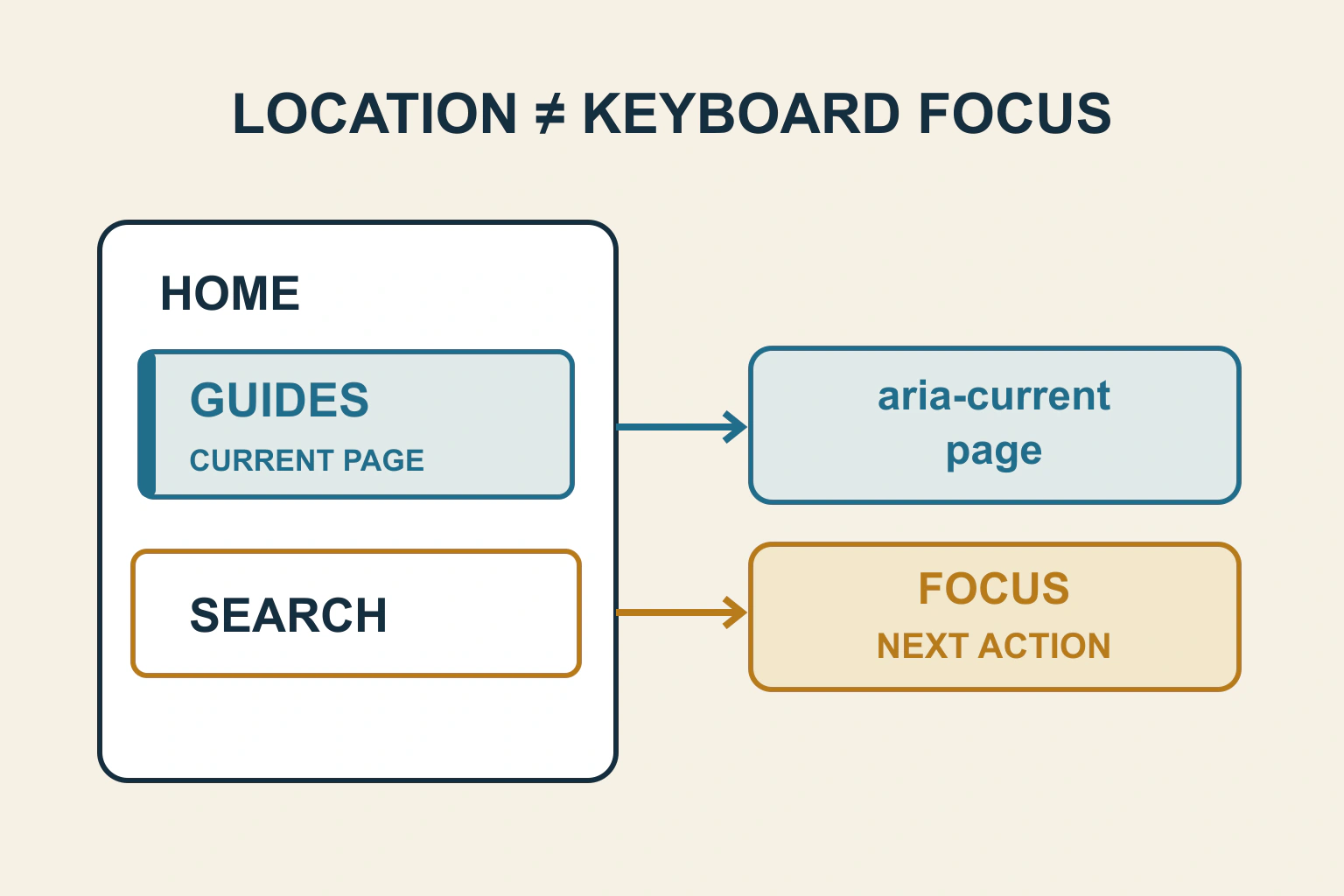
The current page needs an identifiable cue that survives more than a colour change. Pair a visible indication with the correct programmatic current state, and distinguish it from the control that presently has keyboard focus. Mark the actual location within each relevant navigation set.
On a fictional local-history website, the reader opens Guides, then tabs to Search. Guides remains the current page while Search has focus. If both use the same blue fill and no other indication, readers may mistake the pending action for their present location.
Separate three states that often look alike
Current location answers “Where am I?” Keyboard focus answers “Which control receives my next keyboard action?” Selection answers “Which item is chosen in this widget?” They can coincide, but they do not have to. A navigation link can be current while another link is focused.
MDN’s aria-current reference defines values including page, step and location. It also distinguishes the current item from selection state such as aria-selected in a tab widget. Choose the value that describes the relationship, rather than adding several state attributes because the styling calls a link active.
For the history site’s main navigation, Guides can be marked as the current page. In a five-stage submission process, the present stage can use step. A tabbed component needs its selected-tab semantics and keyboard behaviour reviewed separately; calling a tab current does not provide those behaviours.
Define the set before choosing its current item
A page can contain main navigation, a breadcrumb and a process indicator. Each has its own related set. It may be appropriate for the page to be current in both the main menu and breadcrumb; that does not mean two items should be marked current within the same breadcrumb.
Write down what each set represents. A main menu may identify broad site sections, while a breadcrumb identifies the specific article’s hierarchy. If the article sits inside Guides, determine whether the section navigation deliberately marks its parent as current or uses another understandable treatment.
The breadcrumb guide covers choosing honest parents. Do not manufacture a current-page relationship simply because one URL is a substring of another. The public information structure should decide what the cue means.
Make a cue visible without requiring colour recognition
W3C’s Use of Color explanation requires that colour not be the only visual means of conveying information. An underline, border, shape or visible current-page label can give another cue. Choose a treatment that remains recognisable in the actual navigation layout.
In the example, Guides receives a persistent side marker and a small “Current page” label. Search receives a clearly different focus outline when tabbed to. The two cues coexist without requiring the reader to interpret subtly different shades.
Check the treatment in high-contrast or forced-colour environments where available, and with enlarged text. A decorative background image may disappear; a marker should not push long labels outside the menu. Review the contrast and focus-state guide for the surrounding state combinations.
| Situation | Meaning to communicate | Avoid |
|---|---|---|
| Viewing Guides in main navigation | The relevant page or section is current | Using a hover style as the only cue |
| Tabbing to Search | This control has keyboard focus | Moving the current-page marker with every Tab press |
| Stage 3 of a process | The reader is at this step | Marking every completed stage current |
| Selected tab panel | This tab controls the displayed panel | Replacing selected-tab semantics with page location |
Resolve location identity deliberately
Compare the destination the visitor is actually viewing with the navigation model. Exact string comparison can fail when the same page has a trailing slash, a fragment or a tracking parameter. Broad prefix matching can incorrectly mark Guides and Guidebook as the same route.
Ask the maintainer to define identity using the application’s established routing or native platform state. Decide which query parameters change page meaning and which merely track a visit. A filtered archive may still be the same section while a different record requires a different item.
For the history site, opening Guides with a fragment pointing to the archive’s methods section should not arbitrarily unmark Guides. But opening an individual archive record does not necessarily make that record identical to the section landing page. Document the intended parent treatment.
Keep the saved page and later transitions consistent
W3C’s ARIA26 technique demonstrates identifying the current item programmatically and checking its association with the actual current item. That state needs to match the view readers receive, including when a site changes routes without a full document load.
Inspect the initial rendered navigation and its state after an in-page application transition. If the visible marker changes but aria-current remains on the old link, different readers receive different location information. The reverse mismatch is also a defect.
Repeat through Back and Forward. A route that restores the content without restoring the navigation state can leave a plausible-looking but false marker. Do not fix this with a timer that guesses when navigation finished; update through the component’s actual location state.
Handle responsive menus as the same relationship
The compact and wide menus should agree about the current location even if their presentations differ. If separate DOM copies exist, check whether the inactive copy is properly unavailable and whether duplicate visible controls create confusion. Inspect the public output rather than only the editor’s selected menu item.
For a collapsed phone menu, opening it should reveal the current cue. Closing and reopening should preserve the route identity. A current link that remains actionable can simply navigate to its destination; removing it from keyboard access solely because it is current may make the menu inconsistent.
The navigation-menu workflow covers opening, operating and closing a WordPress menu. Current-page identification adds another acceptance question to that working journey; it does not replace it.
Verify location and focus together
- Open the page directly and identify its current item without moving the pointer.
- Tab through neighbouring links and confirm the current cue remains distinct from focus.
- Inspect the programmatic current value and its associated link.
- Follow another route and check both the visual and exposed state update.
- Use Back and Forward, then repeat with the compact menu.
- Review a deep article, a section page, a process step and any actual tab widget separately.
Accept the result when the reader can tell where they are and where their next action will go. Keep the rule simple enough that new pages receive the same honest treatment without manually styling unrelated links.
Sources and verification
Editorial review 2026-10-17. Source check dates are recorded separately. Notes describe what each source supports and its limits.
View sources
- MDN: aria-currentChecked Current page, step, location, date and time values; distinction from aria-selected.
Limits: The attribute communicates state but does not create navigation or determine URL identity. - W3C: ARIA26 current item techniqueChecked Programmatically identifying the current item in a related set and testing its association.
Limits: A sufficient technique for specified criteria is not a complete navigation implementation. - W3C: Use of ColorChecked Colour must not be the only visual means of conveying information or indicating an action.
Limits: It does not prescribe one universal current-page visual style.