
Find the two competing stacking contexts and the first relevant ancestor boundary; change that boundary deliberately rather than escalating a child value.
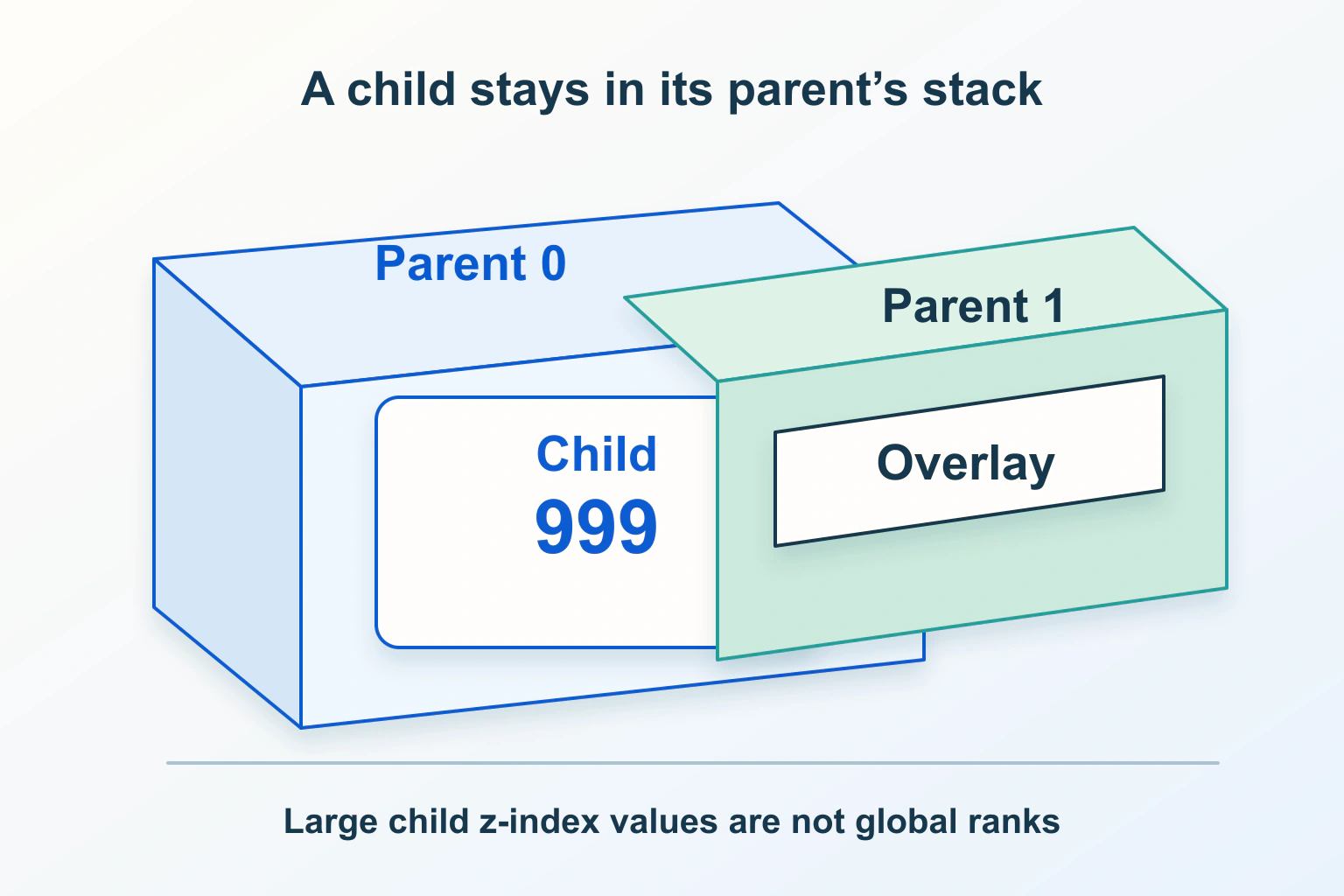
If a dropdown remains behind another page section after its z-index is raised, inspect the ancestors around both elements. The menu may be high inside one local stacking context while that entire context sits below another. Another possibility is clipping: part of the menu is being cut off rather than painted underneath anything.
Imagine a fictional resource page with a filter menu in a header and a large promotional panel below it. The filter opens, but the panel covers its options. The maintainer has already tried a very large number on the menu. The useful next step is to locate the boundary that actually decides the overlap.
Describe the overlap before editing CSS
Capture the exact viewport, scroll position and open state where the problem appears. Identify the menu and the element covering it. Note whether the missing portion follows the shape of a nearby container or appears behind a separate section. This gives the investigation a concrete target instead of an open-ended search through every z-index declaration.
For the resource page, repeat the observation with the promotional panel temporarily hidden in a local development inspection. If the options become visible, that is a useful clue about the competitor; it is not yet proof of the correct permanent fix. Keep this diagnostic experiment separate from an approved change to the page.
Do not combine unrelated repairs immediately. The sticky header guide covers scroll containment and travel. This investigation concerns overlap at a specific position, even if the header also happens to be sticky.
Trace both branches to their shared context
MDN explains stacking contexts as local groups that act atomically within a parent context. Descendants are ordered inside their group. A transform or opacity below one can create such a context, among other triggers. A huge child value cannot automatically outrank a competing ancestor group.
Draw two short ancestor lists: menu to header to page, and panel to content section to page. Ask the developer to inspect computed styles on those paths and mark the context boundaries. The relevant comparison may be header versus content section rather than menu versus panel. Keep a record of the actual styles that establish each boundary.
In the fictional example, suppose the header’s context is ordered below the content section’s context. Changing only the menu’s local value will leave the outer relationship unresolved. That is a proposed explanation to verify, not a diagnosis established for every dropdown with similar symptoms.
Read z-index in the element’s actual layout context
MDN’s z-index reference describes stack level and local context creation for applicable boxes. For a relatively or absolutely positioned element, a non-auto z-index creates a context; relative positioning by itself does not. Do not infer a context merely from seeing position: relative in a stylesheet.
Record whether a declaration is active, overridden or applied to the wrong element. A value in a component file may not be the computed value at the affected breakpoint. Likewise, a number on a wrapper and a number on its child answer different ordering questions. Compare the rendered structure, not just the names of CSS classes.
| Observed symptom | Question to investigate | Focused next check |
|---|---|---|
| Menu behind another section | Which contexts contain both branches? | Compare their outer ordering |
| Menu cut at a container edge | Is overflow clipping involved? | Inspect the clipping ancestor |
| Only one breakpoint fails | Which computed styles change? | Review that breakpoint’s ancestors |
| A decorative animation starts the fault | Does its wrapper gain a context? | Compare computed styles before and during it |
Separate clipping from a lower paint order
The overflow reference distinguishes clipping and scrolling behavior. Raising stack order does not, by itself, remove an ancestor’s clipping boundary. Establish whether the menu is hidden behind another surface, cut off by its own surroundings, or affected by both.
For a clipped filter menu, ask why the clipping container exists. It may keep a rounded photograph tidy, contain a horizontal scroller or serve another deliberate purpose. Removing the rule from the whole component can make the menu visible while exposing unrelated content beyond the card. A narrower structural change may preserve both requirements.
The mobile overflow guide covers unwanted page width. Do not use a global overflow rule to hide the symptom of this layering issue. Include narrow-screen width and scrolling in the acceptance checks for whichever focused correction is chosen.
Choose a correction at the boundary that matters
Consider three distinct options with the developer: adjust the relevant ancestor’s ordering, remove an unnecessary context-creating style, or place the overlay in a structure intended for overlays. The right choice depends on what that ancestor contains and what other surfaces must remain above it. There is no universal number that fixes every component.
For the resource page, raising the entire header may also raise its announcement strip and search panel. Removing a transform may change an animation or positioning arrangement. Moving the menu may affect its relationship with the trigger. Document those consequences before accepting the smallest-looking declaration as the smallest complete solution.
Keep an explicit layer plan for recurring surfaces: page content, navigation, temporary menus and dialogs. The plan should explain relationships rather than encourage each new component to choose a larger number. Review the implementation against the plan whenever a new overlay is added.
Check interaction after the menu becomes visible
A visible dropdown can still be unusable. Check that the trigger, options and dismissal behavior remain reachable by keyboard and pointer, that focus is discernible, and that opening the menu does not leave another unexpected surface intercepting actions. Confirm the chosen menu item produces the intended result.
If the interface is actually a modal dialog, use the dialog focus and continuation guide. A stacking correction does not provide dialog semantics or focus management. Keep those responsibilities in the appropriate component rather than treating visual prominence as proof of correct interaction.
Close the issue with a small regression matrix
Propose checks at the failing width, a neighboring breakpoint, and a narrow mobile width. Repeat near the top and after scrolling, with any relevant header animation both idle and active. Include a second overlay so the fix does not merely reverse the original collision and place the menu above a surface that must take priority.
Save the computed boundary evidence and a before-and-after view from the same state. These are suggested checks, not results of tests performed for this article. Close the issue when the intended layer relationship, container behavior and interaction all hold in the affected journeys.
Sources and verification
Editorial review 2026-10-15. Source check dates are recorded separately. Notes describe what each source supports and its limits.
View sources
- MDN: stacking contextsChecked Stacking contexts are atomic in their parent; transforms and opacity can create them.
Limits: Several other features also establish contexts. - MDN: z-indexChecked An integer sets stack level and creates a local context for applicable boxes.
Limits: Relative positioning alone is not sufficient. - MDN: overflowChecked Overflow modes govern clipping and scrolling.
Limits: Clipping and stacking are separate constraints.