
Keep Lite for suitable simple enquiries; choose the lowest paid tier for a verified missing workflow. Evaluate Pro payment-fee savings using incremental annual cost, not hypothetical revenue.

Keep WPForms Lite when a straightforward contact form and email notifications cover your needs. Pay when a specific missing workflow matters: a local entry archive, a required integration, or advanced payment controls. Buying the cheapest paid tier does not remove the WPForms Stripe platform fee. Choose the smallest plan that resolves the actual limitation, including the cost after the first year.
This is a researched buying guide, checked against official documentation on 10 October 2026. We have not purchased these plans, tested payment processing or measured email delivery. The recommendations below are editorial decisions based on the documented differences.
Which version fits your form?
Write down what should happen after someone presses Submit. A request that reaches an inbox, a record that staff can search in WordPress and a completed payment are separate outcomes. Decide which ones your website needs before choosing a subscription.
| Your requirement | Option to investigate | Check before choosing |
|---|---|---|
| Simple enquiries sent to email | Lite | Delivery and a suitable way to retain important messages |
| A searchable entry archive inside WordPress | Basic or another suitable paid tier | Who can access it and how it will be backed up |
| A specific email marketing integration | The lowest tier listing that integration; Plus includes MailerLite and Brevo | The destination service and its separate subscription |
| Conditional Stripe payment logic or the qualifying platform-fee exemption | Active Pro or Elite; Stripe Pro addon where required | Eligibility, incremental licence cost and processor charges |
| Several sites or a more involved workflow | The tier matching the actual site count and required addon | Documented limits instead of the largest bundle name |
Basic already lists entry management, file uploads and field conditional logic. Field logic is different from conditional payment logic. Do not buy the named Pro plan simply because a general comparison calls every paid version “Pro.” Check the current tier feature list for your requirement.
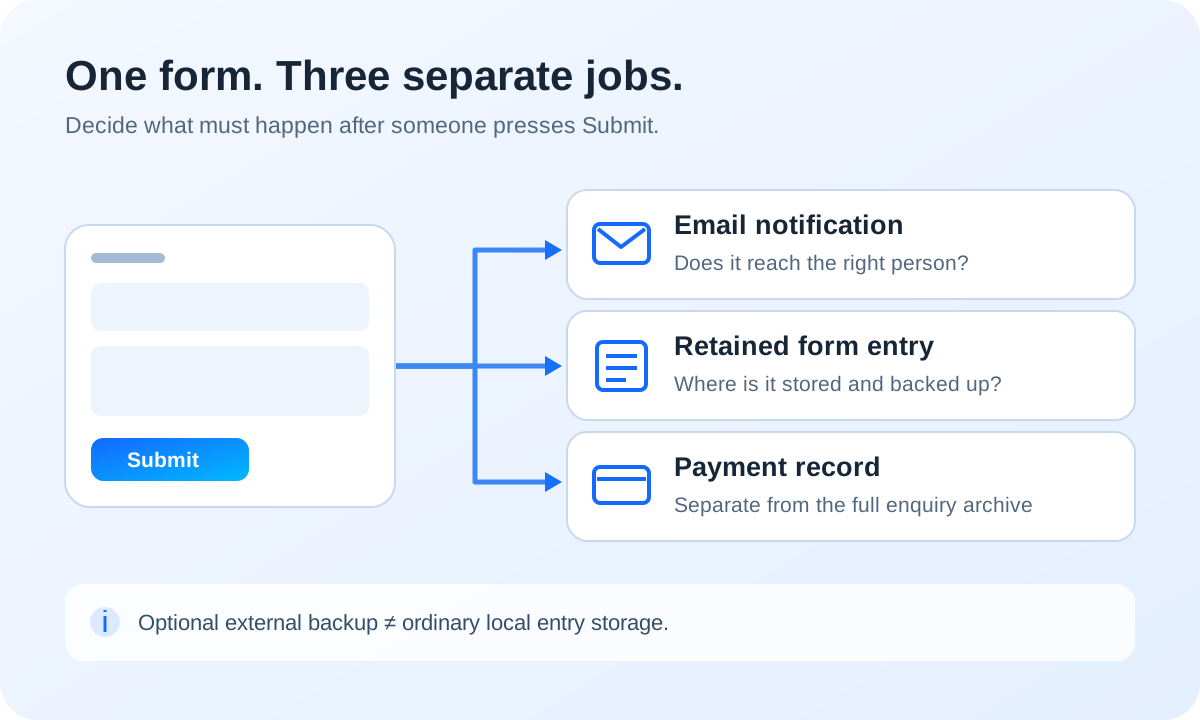
An email notification is not an entry archive
For ordinary form submissions, Lite does not provide the normal local WordPress entry database available with paid entry management. Its payment records are a separate feature; seeing a transaction under Payments does not prove that every contact enquiry has been archived. See the Lite payment documentation and entry-management documentation.
With a paid entry workflow, staff can review, export and delete saved records in WordPress. Local storage is useful when a message is missed, but it creates another data store to maintain. Limit access, decide what to retain and include the database in your backup process. A notification address should belong to someone who will actually respond.
Lite Connect is an optional external backup, not the same local archive. When enabled, it backs up new entries on WPForms servers. Each entry is kept for one year. A paid upgrade can restore the backed-up history that is still available; it cannot recreate submissions made before activation or entries that have already expired. Deleting the associated form can also prevent restoration. The total submission count is not a promise that every entry remains recoverable. Read the Lite Connect retention and restoration rules before relying on it.
If customers may send confidential information, first decide whether the form needs those fields at all. Consider where email copies, local entries, exports and optional external backups will live. A plugin feature labelled privacy or compliance does not make those decisions for your business.
What changes with Stripe payments?
WPForms documents a 3% platform fee for Stripe payments on Lite, Basic and Plus, on top of Stripe’s own charges. An active qualifying Pro or Elite licence removes the WPForms fee; it does not remove the payment processor’s fees. This is why Basic can solve an entry-storage problem while leaving the payment-fee calculation unchanged. Version comparison; Stripe Pro licence requirements.
Recurring Stripe subscriptions are already supported in Lite. Eligible Apple Pay and Google Pay availability also depends on Stripe’s country, device and domain requirements, rather than simply buying a higher tier. Conditional payment logic requires Pro or higher and the Stripe Pro addon. Confirm merchant eligibility and HTTPS before planning a live payment form. These details come from the official Lite Stripe guide.
Compare the annual commitment
| Plan | Introductory year | Regular annual reference | Sites |
|---|---|---|---|
| Basic | US$49.50 | US$99.00 | 1 |
| Plus | US$99.50 | US$199.00 | 3 |
| Pro | US$199.50 | US$399.00 | 5 |
| Elite | US$299.50 | US$599.00 | Unlimited |
These are the provider’s global USD references, not a United States tax-inclusive checkout or a European invoice. Promotional prices apply to the initial term; renewals use the applicable full rate. Confirm tax and the final amount using your billing details on the official pricing page.
Budget for continued maintenance, not just installation day. The licence terms tie updates and support to the subscription and permit restrictions after expiry. Review automatic renewal and cancellation before buying. Do not assume an expired paid licence leaves every form-editing or connected service available indefinitely.
When could removing 3% cover the licence?
Use incremental annual licence cost ÷ 0.03 as a simple fee comparison. Starting from free Lite, the US$199.50 introductory Pro cost corresponds to US$6,650 of eligible Stripe payment volume in that year. At the US$399 regular annual reference, it corresponds to US$13,300. Those are arithmetic examples, not projected sales, profit or a promise that an upgrade will pay for itself.
If you already need Basic for entry management, compare the additional cost of the upgrade instead of charging the whole Pro licence to the payment decision. Use the actual upgrade quote and remaining coverage; do not assume a fixed credit. Compare the same period and currency, include applicable tax, and keep Stripe’s own fees in both scenarios. A genuinely needed Pro feature can justify the purchase independently of volume.
A free local-storage alternative
Contact Form 7 with Flamingo is worth considering for a straightforward enquiry form. Contact Form 7 does not save messages by default; Flamingo adds storage in the website’s database. It is a different setup, not a claim that every paid WPForms integration or payment workflow has a free equivalent.
Check the current Contact Form 7 compatibility requirements against your WordPress and PHP versions before installation. Review the Flamingo storage description, configure the message fields, and include those records in your access, retention and backup decisions. We have not installed or tested this alternative here.
Check the whole enquiry journey before buying more
- Submit a realistic enquiry and check the confirmation, recipient inbox and reply workflow. A working-looking form is not proof of delivery.
- Decide which fields and records you need, where they are stored, who can see them and when they should be deleted.
- Verify that your backup covers the relevant database and test restoration away from the live site.
- Check the form on mobile and with a keyboard, including validation, labels and an understandable error message.
- For payments, use the provider’s documented test mode before enabling a live checkout, and verify the exact plan, fee and renewal terms.
Your next step: solve the missing workflow, then buy only if a verified limitation remains. For missing messages, use our WordPress form-email diagnosis. For retained entries, follow our recoverable WordPress backup guide. When changing plugins, read how to test a WordPress update before it goes live.
Sources and verification
Editorial review 2026-10-10. Source check dates are recorded separately. Notes describe what each source supports and its limits.
View sources
- WPForms annual plans and pricingChecked Four annual USD prices, regular prices, site allowances, Basic entry management and Plus integrations.
Limits: Public introductory display; tax excluded, no personalised checkout or European invoice. - WPForms Lite and paid comparisonChecked Lite, Basic and Plus carry the 3% WPForms Stripe fee; eligible active Pro and Elite waive it.
Limits: Provider comparison; its generic Pro wording sometimes means paid versions. Named pricing tiers take precedence. - Stripe in WPForms LiteChecked Lite supports recurring Stripe payments, separate payment records and eligible wallets; payment conditional logic requires Pro and Stripe Pro.
Limits: Processor eligibility, HTTPS and wallet requirements apply; no payment or delivery test performed. - WPForms Stripe Pro addonChecked Pro or higher is required for the addon; the platform-fee exemption requires an active qualifying licence.
Limits: Stripe charges remain; this addon documentation does not grant the exemption to Basic or Plus. - WPForms Lite ConnectChecked Optional external backup begins after activation; each entry expires after one year; a paid upgrade can restore available history.
Limits: Not ordinary local Lite entry storage; earlier, expired or deleted-form entries are not recoverable through this feature. - WPForms entry managementChecked Paid entry workflow includes viewing, exporting and deleting database records; form notifications are a separate function.
Limits: Documentation does not prove receipt of an email, a successful restore or suitability for a particular retention obligation. - WPForms licence termsChecked Introductory discounts apply to the initial term; renewals use the applicable regular rate; expiry can restrict services.
Limits: Terms may change. No account, cancellation, contract acceptance or purchase has been performed. - Contact Form 7 with FlamingoChecked Contact Form 7 does not save messages by default; the free Flamingo plugin adds message storage.
Limits: Requires configuration; not a claim of parity with WPForms paid features or recovery of earlier messages. - Contact Form 7 plugin directoryChecked Free plugin and current WordPress/PHP compatibility requirements.
Limits: Current directory lists WordPress 7.1 and PHP 8.3 minimums; not installed or tested on this site. - Flamingo plugin directoryChecked Flamingo stores submission data in the database on the website host.
Limits: Stored personal data needs appropriate access, retention and backups; not a separate off-site archive.