
A hosted website builder can be a sensible choice when you want one service to operate the website while you concentrate on its pages. Self-hosted WordPress is a sensible choice when control over the content system, extensions and hosting arrangement matters enough for you to manage those decisions. Neither is the automatic winner for every small website.

This comparison uses self-hosted WordPress: the WordPress software running with a host you choose. WordPress.com is a hosted service with a different service arrangement; see WordPress.com vs WordPress.org if that is the product you mean.
What exactly are you comparing?
A hosted builder combines an editing system with the service that runs the site. Wix is one documented example: its support documentation says a site built with Wix’s technology needs Wix’s servers, and that Wix handles its platform updates. This is a product example, not evidence about every builder. Wix hosting and export documentation.
WordPress is software you can extend through themes and plugins without a WordPress software licensing fee. Choosing it still leaves a hosting and maintenance decision. A host can handle some of that work, so self-hosted does not necessarily mean maintaining a server alone. WordPress features.
That gives you a useful third option: WordPress on a managed hosting plan. Compare the actual responsibilities in shared hosting vs managed WordPress hosting before assuming that choosing WordPress requires doing every technical task yourself.
Choose by the editing work you will repeat
Make a list of the pages you will actually publish: a home page, a service description, a contact page, a portfolio and perhaps a growing library of articles. Then try building a representative page rather than choosing from a gallery of attractive demos.
WordPress’s native editor works with content blocks such as paragraphs, images, headings and lists. A separate commercial page builder is not a prerequisite for writing posts or pages. WordPress block editor documentation.
A practical evaluation should answer four questions:
- Can you change a heading, add a useful image description and rearrange sections without help?
- Can you keep repeated details, such as opening hours, consistent across pages?
- Can you create the kind of navigation your readers need as content grows?
- Does your chosen template remain readable on a small screen after you replace the demo text with your own?
These questions should be tested against your own content. The demonstration below checks one native WordPress draft; it does not compare hosted-builder accounts.
A concrete WordPress editing example
On 15 October 2026, we saved a six-block service-page draft in our WordPress 7.1.3 installation and selected the editor’s mobile preview. The heading, paragraphs and three-item list remained readable in that preview. The canvas measured 479 pixels including its scrollbar.
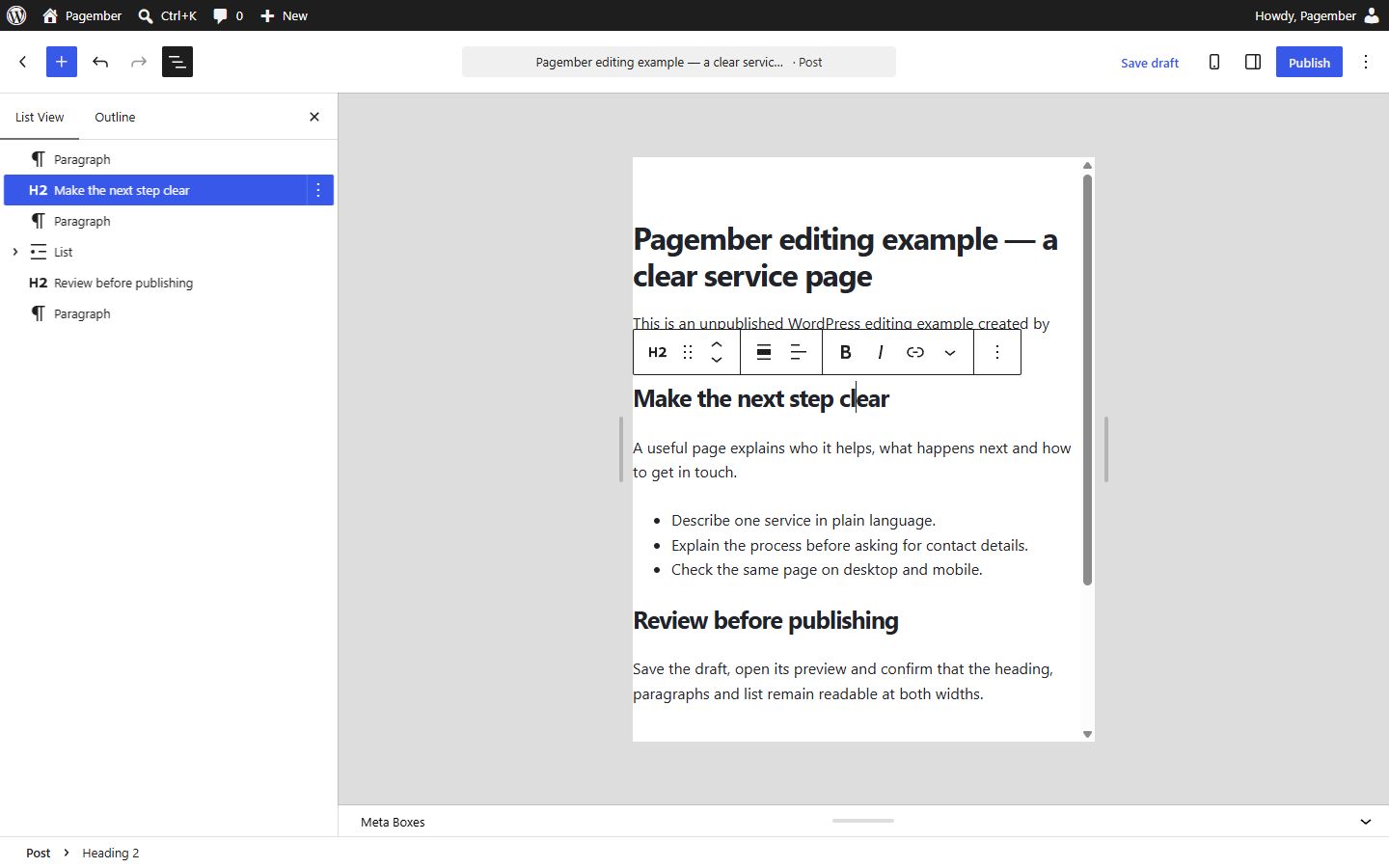
This demonstrates one native editing workflow you can try before choosing an extra tool. We did not test a hosted builder account, public publishing, support quality or performance. Repeat the same task with your own template and real copy before deciding.
Write down who will maintain the site
WordPress’s official update guidance recommends keeping the software updated and making a backup before an update. Its backup handbook distinguishes site files from the database; you need both for a complete recovery plan. WordPress updates and WordPress backups.
The following table is a responsibility checklist. It is not a promise that a particular plan includes these services.
| Task | Question for a hosted builder | Question for a WordPress setup |
|---|---|---|
| Platform updates | Which parts of the platform are maintained by the service? | Who updates core software, themes and plugins? |
| Recovery | What can be restored, how far back, and who can request it? | Are files and database backed up, and has recovery been checked? |
| Account access | Can you recover the owner account if a staff member leaves? | Who controls the host, domain and WordPress administrator accounts? |
| Custom features | Is the feature built in, an add-on, or unavailable? | Is there a supported extension, and who maintains it? |
| Help | Does support cover the problem you need solved? | Is the problem covered by the host, extension developer or your maintainer? |
You remain responsible for decisions such as who gets access, what content you upload and whether you retain an independent copy of important material. Outsourcing infrastructure does not remove those decisions.
Compare the complete cost, including time
Prepare two budgets for the same requirements and the same period. For the builder, include the eligible site subscription, domain renewal, mailboxes, necessary apps and any selling or payment costs. For WordPress, include hosting, domain renewal, any paid theme or extensions, backup arrangements and maintenance help you expect to need.
Use the payable total and the renewal conditions, not a headline monthly equivalent alone. Record whether a quoted amount assumes a long initial commitment, which taxes apply in your market and which extras become chargeable later. No universal price would accurately represent those different baskets.
A custom domain is also a plan question. For example, Wix currently requires an upgrade to connect one and distinguishes Wix Editor Premium plans from Studio plans. A quote for one product should not be assumed to cover the other. Wix plan conditions.
Assign a realistic owner for recurring work. If you dislike maintaining software, a cheaper invoice can still be a poor fit when nobody has time to investigate a broken form. If you already have a capable maintainer, paying to outsource the same task twice may add little value.
Check your exit before committing
WordPress has a native content export using the WXR format. That helps move editorial content to another WordPress installation, but a complete migration still needs attention to files, design, extensions and settings. WordPress export documentation.
Wix’s documented requirement to operate on its own infrastructure means you should not budget for simply copying a Wix-built site onto a generic host. Moving to a different publishing system can require rebuilding the design and recreating functionality. Wix external hosting limitation.
For any candidate, ask what can be exported: article text, images, customer records, form submissions and store data are separate questions. Also ask what happens to your domain and mailboxes if you cancel the site subscription. Keep original content and images in a location you control.
A fictional example: a tutor’s website
Maya is a fictional tutor who needs five information pages and a clear way for prospective pupils to contact her. She expects to revise prices twice a year and has no custom application requirement. An eligible hosted builder could fit if its contact workflow, domain conditions and renewal budget work for her.
Now change the requirement: Maya wants to publish a searchable library of lessons, let another editor review drafts and use a specific learning extension. WordPress becomes worth evaluating, provided that extension is suitable and someone owns maintenance. It does not win solely because the future site will have more pages.
The decision changes because the workflow changes. Neither example predicts product performance or assumes a provider has been tested.
A decision checklist
- List today’s essential features and separate them from speculative future features.
- Try one real page, its mobile layout and the editing tasks you will repeat.
- Get written answers about maintenance, recovery and support scope.
- Compare equivalent initial and renewal budgets, including email and necessary add-ons.
- Check export options and account ownership before a long commitment.
- Choose the arrangement you can operate reliably, with enough flexibility for the requirements you can actually describe.
For your next decision, browse our website tool comparisons to compare specific platforms and responsibilities before choosing a plan.
If your main uncertainty is whether a builder needs a second hosting subscription, read Do website builders include hosting?
Research basis: official documentation checked on 6 October 2026. This is an explanation and editorial decision framework, not a hands-on performance test or a provider ranking.
Costs alongside this guide
A hosted builder and self-hosted WordPress have different ownership and maintenance responsibilities.
Hosted website builders

Webnode
Explore the service
A hosted website builder for creating and publishing a site without arranging separate web hosting.
Choose a plan for the domain, email and site features you need. Confirm the current offer and renewal on Webnode.
Other researched options
USD · US / global observations

Wix · Light
- Initial term & commitment
- Initial term amountUS$204.0012 months termUS$17.00per month equivalent; prepaid term
- Renewal
Taxes excluded
Price observed 2026-10-07 · Recheck due
Plan details & sources
A brochure site.
2 GB storage; 2 collaborators; does not accept payments.
Choose another option if: You expect a portable native WordPress installation or have not checked required features.
Public USD reference · Taxes excluded
Renewal: Standard rate at renewal; exact amount unconfirmed
Taxes excluded
Prices checked 2026-10-07 · recheck dueOfficial price source ↗- Domain: Conditions or paid extras apply. Eligible annual plans; promotional year
- Hosting & SSL: Included. Wix hosting and automatic SSL included
- Email: Not included. Business email sold separately
- Online payments: Not included. Cannot accept online payments
- Domain, Email, Online payments ↗Features checked 2026-10-07
- Hosting & SSL ↗Features checked 2026-10-08
Observed 2026-10-07 · Recheck due
Official price evidence ↗Self-hosted WordPress

Kinsta · Single 20GB · monthly, first-month promotion
- Initial term & commitment
- Initial term amountUS$0.001 month termfirst month only; current standard after promotion US$35/month
- Renewal
- US$35.00current standard monthly rate after free first month; not a lifetime guaranteeConfirm renewal billing term ↗
Check local tax at checkout
Price observed 2026-10-15
Plan details & sources
One WordPress site whose managed workflow and capacity match the ongoing budget.
1 WordPress install; 20 GB server bandwidth; 10 GB storage; 125 GB CDN; 14-day backup retention; staging; provider-described WAF/DDoS/malware removal.
Choose another option if: You compare only the free month or need greater storage/bandwidth without budgeting overages.
Public USD reference; billing country unconfirmed · Check local tax at checkout
Published first-month promotion amount
Check local tax at checkout
Prices checked 2026-10-15Official price source ↗- Domain: Not included. A standard .com domain is purchased separately
- Email: Not included. Mailbox hosting is purchased separately
- SSL: Included. SSL included for the first 12-month comparison horizon
- Backups: Included. Daily backups included
- Domain, Email, SSL, Plan allowance, Tradeoff ↗Features checked 2026-10-11
- Backups ↗Features checked 2026-10-11
Observed 2026-10-15
Official price evidence ↗IONOS
IONOS · Web Hosting Essential · first-year offer
- Initial term & commitment
- Listed rateUS$4.00per month for first-year offer; payment schedule unconfirmed12-month commitment · First invoice: check quote
- Renewal
- US$8.00per month renewal reference; invoice duration unconfirmedConfirm renewal billing term ↗
Check local tax at checkout
Price observed 2026-10-15
Plan details & sources
A modest bundled site needing one small mailbox within stated resource limits.
100 GB NVMe; 1 email account 2 GB; first-year domain; wildcard SSL; basic malware scan; advertised unlimited sites/traffic constrained by resources and 262,144 inodes.
Choose another option if: You require more mailboxes, CDN entitlement or unlimited resources in practice.
US product-page USD reference; billing country unconfirmed · Check local tax at checkout
Payment schedule and initial amount not confirmed
Check local tax at checkout
Prices checked 2026-10-15Official price source ↗- Domain: Conditions or paid extras apply. One eligible domain for year one; renewal costs extra
- Email: Included. Email included for the first 12 months; plan limits and promotion eligibility apply
- SSL: Included. SSL included for the first 12-month comparison horizon
- Backups: Included. Daily backups included
- Domain, Email, SSL, Plan allowance, Tradeoff ↗Features checked 2026-10-11
- Backups ↗Features checked 2026-10-11
Observed 2026-10-15
Official price evidence ↗
hosting.com · Starter · 48-month prepaid offer
- Initial term & commitment
- Initial term amountUS$95.4948 months termUS$1.99rounded monthly equivalent for 48-month prepaid offer
- Renewal
- US$13.99per month renewal reference; invoice duration unconfirmedConfirm renewal billing term ↗
Check local tax at checkout
Price observed 2026-10-15
Plan details & sources
Modest sites whose long prepaid bundle and later rate fit.
5 sites; 15 GB NVMe; email/SSL; malware removal; daily off-server backups; managed migration; no Starter staging/preview.
Choose another option if: You require Pro staging or cannot commit four years and afford renewal.
United States (Global) browser USD reference; billing country unconfirmed · Check local tax at checkout
Exact published Pay Today amount
Check local tax at checkout
Prices checked 2026-10-15Official price source ↗- Email: Included. Email included for the first 12 months; plan limits and promotion eligibility apply
- SSL: Included. SSL included for the first 12-month comparison horizon
- Backups: Included. Daily backups included
- Email, SSL, Backups, Plan allowance, Tradeoff ↗Features checked 2026-10-11
Observed 2026-10-15
Official price evidence ↗Recorded prices can change. Check eligibility, taxes and the current full bill with the provider. Different currencies and services are shown separately.
Sources and verification
Editorial review 2026-10-06. Source check dates are recorded separately. Notes describe what each source supports and its limits.
View sources
- WordPress.org: FeaturesChecked WordPress is extensible with themes and plugins; the software has no licensing fee.
Limits: Project feature descriptions are not evidence of performance or plugin compatibility for a particular installation. - WordPress.org: WordPress Block EditorChecked The native WordPress editor uses blocks for content, including paragraphs, headings, images and lists.
Limits: Editing capabilities depend on the installed WordPress version, theme and extensions. - WordPress.org: Updating WordPressChecked WordPress needs updates and recommends a backup before updating.
Limits: Not a guarantee of which updates a third-party hosting contract performs. - WordPress Advanced Administration: BackupsChecked A complete WordPress backup includes database and files.
Limits: Does not prove a host's backup retention or restore service. - Wix: Exporting or Embedding Your Wix Site ElsewhereChecked Sites built with Wix's proprietary technology must operate on Wix infrastructure.
Limits: Specific to Wix sites; not a claim that every builder lacks exports. Provider uptime and security marketing were not evaluated. - Wix: Premium Plan PricingChecked Custom domains require an eligible upgrade; Wix Editor Premium and Wix Studio plans differ.
Limits: No checkout observed; no price or universal feature guarantee reported. - WordPress.org: Tools Export screenChecked WordPress has a native WXR content export and import workflow.
Limits: A content export is not a full working copy of the installation.