
Editorial opinion with explicit exceptions: prototype a simple site natively before buying an additional page builder.
Our editorial view: start with WordPress’s native editor for a straightforward blog or service website. Buy a paid page builder when you can name a requirement it solves, test that solution and justify the continuing cost.
Why we recommend starting small
A first website usually needs a clear home page, service information, contact details and useful articles. The difficult work is deciding what to say and how visitors will find it. Another editing interface does not make those decisions for you. Starting with fewer dependencies also gives you fewer subscriptions and tools to maintain.
The native block editor supports headings, paragraphs, images, lists and other content blocks. Patterns offer reusable layouts; a synced pattern changes across its uses. With a suitable block theme, the Site Editor can also expose templates and site-wide styles. Those capabilities are sufficient to prototype many simple pages.
Try this before purchasing
- Choose a theme appropriate for the website and verify the editing controls it actually provides.
- Build one representative page with the native editor. Use real copy, not a beautiful demo that hides weak content.
- Test the menu, contact path and reading experience on a phone. Save and reopen the page to check that another editor can maintain it.
- List remaining requirements. Separate an essential function from a preference about the interface.
Our portal uses native WordPress content blocks for its articles. Its presentation also uses a custom theme and a small plugin; that is not a claim that every part was built in the Site Editor or that custom development is free. The useful lesson is that editorial content can stay editable without buying a page-builder subscription.
What we tried in the native editor
On 15 October 2026, we built an unpublished service-page draft in our WordPress 7.1.3 installation. It used six top-level native blocks: two headings, three paragraphs and a list with three items. We saved the draft and checked its block list and editor previews.
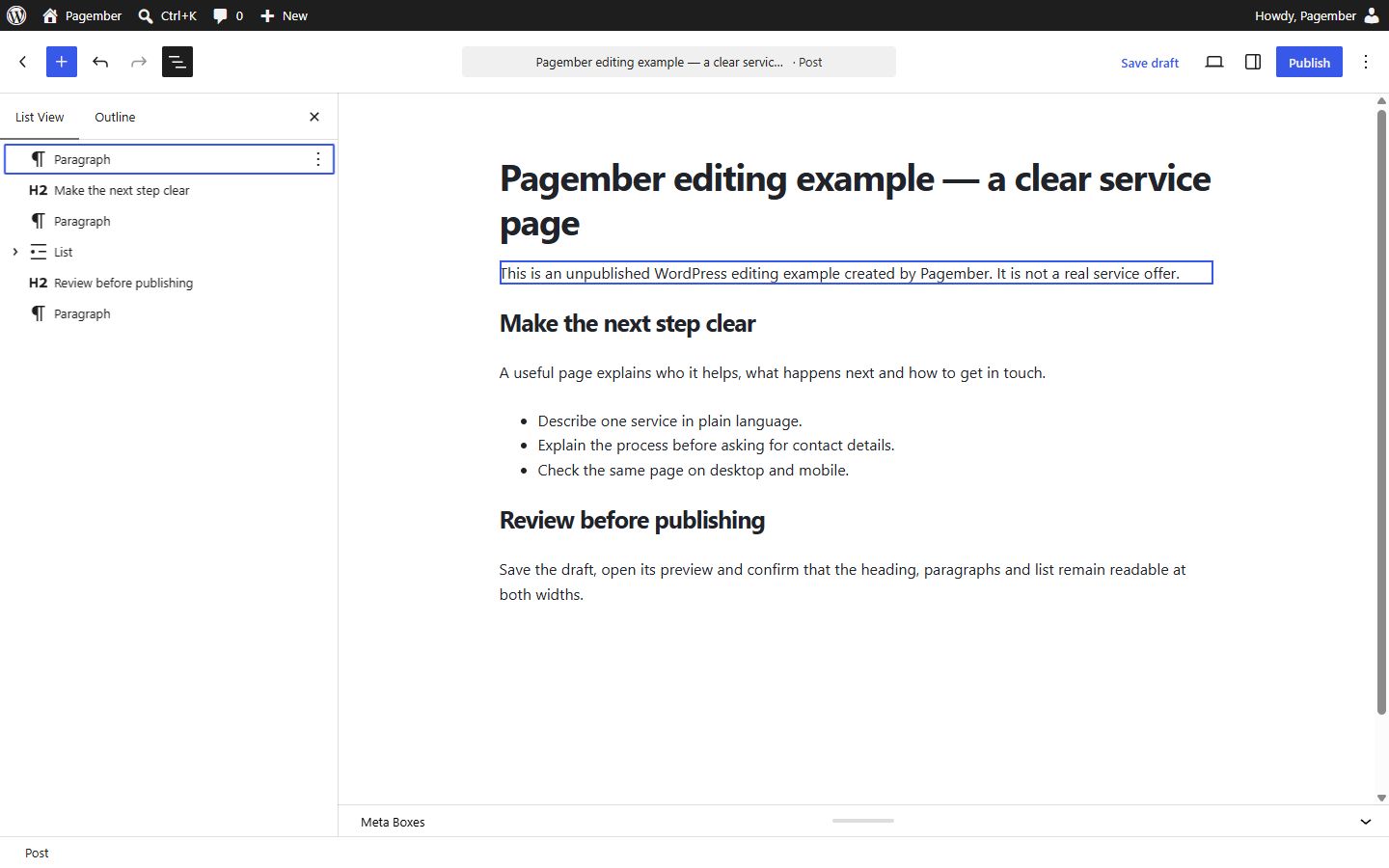
The headings, paragraph and list remained readable in the editor’s desktop and mobile previews. The useful result is a concrete page you can prototype before buying an extra editor. This checks native editing and draft preview only; it does not compare commercial builders, hosting speed, accessibility conformance or visitor conversion.
When paying can be the better decision
A builder may be worthwhile for a team with an established workflow, a required component library or a landing-page requirement that its chosen theme cannot meet efficiently. Training and delivery speed can outweigh the licence fee. Accessibility, performance and maintainability must be evaluated on the actual output, not inferred from a product category.
| Situation | Our starting recommendation |
|---|---|
| Simple blog or brochure site | Prototype with native blocks and an appropriate theme. |
| Team already maintains a builder-based site | Evaluate the cost and disruption of changing before rebuilding. |
| A specific required feature is missing | Test a focused tool against that requirement. |
| No one can maintain the site | Consider support or a managed platform, not just another editor. |
Compare the continuing cost
Ask what renews, how many websites the licence covers and what happens after cancellation. Include theme costs, paid add-ons and the work of keeping the site supported. Do not assume content remains portable or editable after removing a builder: test a representative page in a private copy and read the current licence terms.
We have not benchmarked commercial page builders or measured their performance. This opinion is a requirement-based recommendation, not a speed ranking. A poorly constructed native page can be slow too. Avoid purchasing purely because a demo looks impressive or because an affiliate commission makes a product attractive to the publisher.
If you want less administration
If running WordPress itself is the problem, a hosted website builder may fit better than adding a WordPress editing tool. Compare website builders with WordPress on ownership, ongoing cost and responsibilities. The right decision can be to buy a managed solution; the point is to pay for a problem you understand.
Costs alongside this guide
Optional paid page builder
A paid page builder is optional, not a requirement for following this guide.
USD · US / global observations

Elementor · Essential — annual
- Initial term & commitment
- Initial term amountUS$60.0012 months termUS$5.00US$60 published annual payment, equivalent to US$5/month. Tax and renewal are separate.
- Renewal
Check local tax at checkout
Price observed 2026-10-15
Plan details & sources
One site with a defined need for the Essential editor features.
1 WordPress site; editor, Theme Builder and form design within Essential feature limits.
Choose another option if: Hosting, popups, custom CSS/code and ecommerce are outside this plan.
USD public pricing; checkout country and tax not selected. · Check local tax at checkout
Renewal: A separate future renewal amount was not established. Confirm the renewal invoice and current terms.
Check local tax at checkout
Prices checked 2026-10-15Official price source ↗Observed 2026-10-15
Official price evidence ↗Recorded prices can change. Check eligibility, taxes and the current full bill with the provider. Different currencies and services are shown separately.
Sources and verification
Editorial review 2026-10-07. Source check dates are recorded separately. Notes describe what each source supports and its limits.
View sources
- WordPress block editorChecked Native blocks build editable posts and pages.
Limits: Editor capability does not prove a particular theme meets every business requirement. - WordPress block patternsChecked Reusable layouts and synced patterns; changes to a synced pattern affect its uses.
Limits: Theme compatibility and available design controls vary. - WordPress Site EditorChecked Block themes can expose site-wide templates and styles in the Site Editor.
Limits: Not every classic theme supplies the full Site Editor.